Connections
Your banks, how long each consent lasts, when each account was last synced, and the money moved between your own accounts.
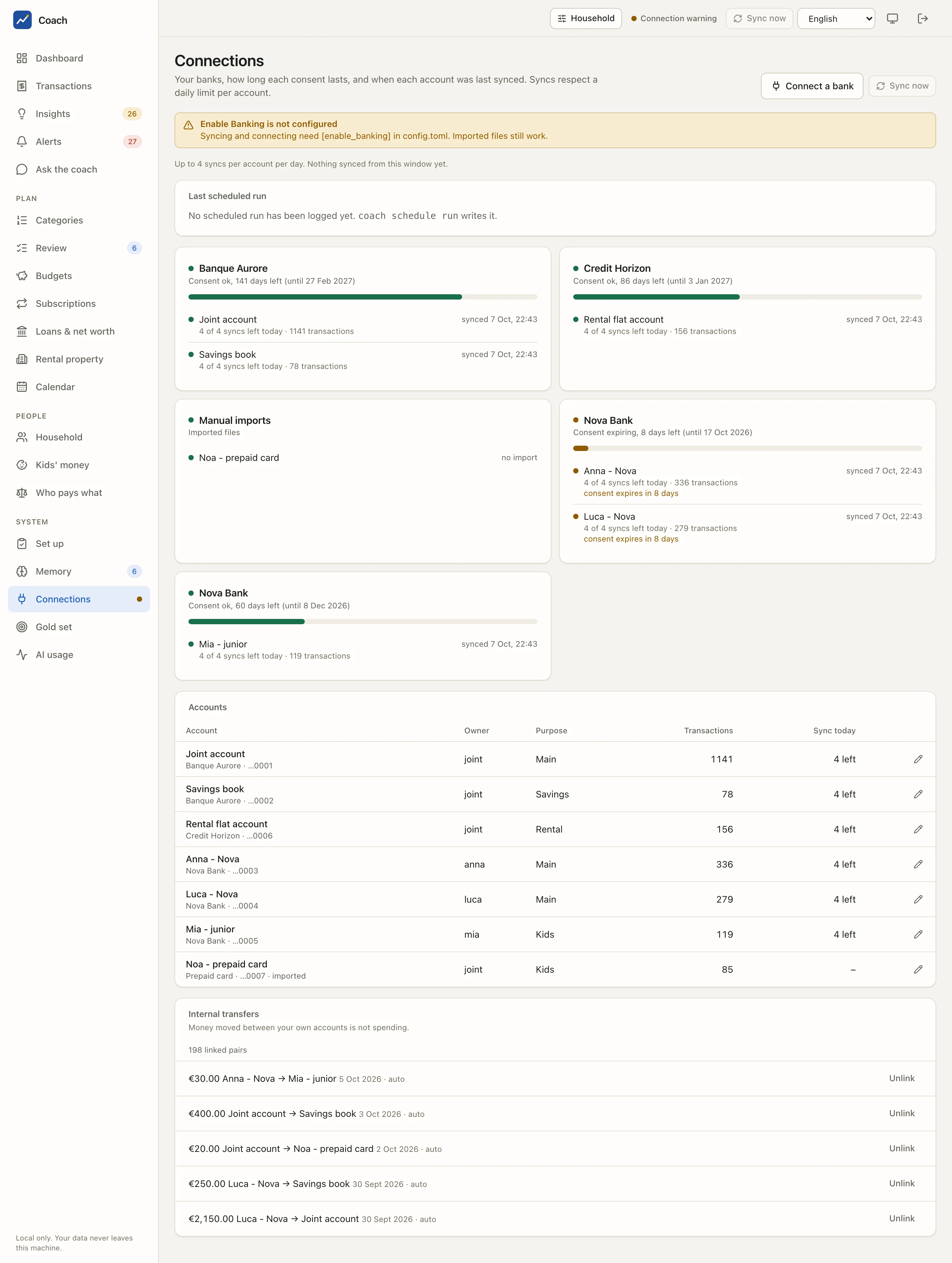
The app reads your accounts through Enable Banking (PSD2), in restricted mode for your own accounts, with a consent you give on your bank's own page. The app never sees your bank password, and it only reads transactions and balances. Banks you cannot link are fed with CSV, OFX or CAMT.053 files.
What you see
Consents and health
One card per bank consent (and one for Manual imports, the accounts you feed with files):
- The consent: "Consent ok, 141 days left (until 27 Feb 2027)", with a bar of the time left. It turns amber when the consent is close to expiring ("Consent expiring, 8 days left"), and each account under it says "consent expires in 8 days".
- Each account: a dot for its health, when it was last synced, how many syncs are left today and how many transactions it holds.
A consent lasts at most 180 days (the bank may grant less). When it runs out, the data of that bank simply stops updating; nothing else is lost. The warning in the header (Connection warning) and the alerts tell you in time: at 14 days, at 3 days and on expiry.
Enable Banking is not configured
A fresh install shows this banner: syncing and connecting need the [enable_banking] section of config.toml. Imported files still
work. See Install.
Accounts
The table lists every account with its bank and the last digits of its IBAN (the rest is masked), its Owner, its Purpose, how many Transactions it has and how many syncs are left today (Sync today). The pencil opens Edit account:
- Name: the label you see everywhere in the app;
- Owner:
jointor a household member, the default person of its transactions (see Household & kids); - Used for: main, cards, rental, kids or savings;
- Leave this account out of analytics: the account stays in the database but is ignored by every figure.
An account flagged needs review appears after a reconnection when the bank returned an account the app could not match with certainty. It is left out of the analytics until you decide; saving it here keeps it as its own account.
Internal transfers
Money moved between your own accounts is not spending. The app pairs a debit on one account with the matching credit on another and links them: "€400.00 Joint account → Savings book 3 Oct 2026 · auto". The count of linked pairs is on top.
- A confident pair is linked automatically (
auto). - A pair the app is unsure about is proposed with its confidence: press Link to confirm it.
- Unlink removes a wrong link; that pair is not proposed again.
Transfers between different banks get a slightly wider window (weekends, instant credits). A parent's top-up to a child's account is an internal transfer for the household and income for the child, see Kids' money.
Last scheduled run
The card shows the last run of the daily job: its steps, how long each took, and which failed. "No scheduled run has been logged yet" means the daily job has not run; see Daily job & backups.
Everyday use
Sync now
Sync now (on the page and in the header) asks your banks for new transactions, in the background. Banks cap how often an
application may read an account without you being present, so the app keeps a daily limit per account ([sync] daily_limit, 4 by
default): an account at its limit is skipped and reported. The daily job syncs for you, so you rarely need the button.
Connect a bank
- Press Connect a bank.
- Pick the Country, Find your bank, and choose the Consent length (days). The bank may grant less.
- Press Continue to the bank, then Open the bank login and authenticate on your bank's own page.
- Come back: the window finishes by itself. Your browser warns once about the local certificate of the redirect page; accept it.
- Run a sync to pull the history.
Reconnect
Before a consent expires, press Reconnect on its card. You go through the bank's login again; when it completes, the old consent is retired and your accounts keep their names, owners, purposes and history.
One consent per bank
Keep a single active consent for each bank. A bank allows few concurrent authorisations, and a second one can invalidate the first.
From the terminal
uv run coach consents                    # each consent with its days left
uv run coach health                      # per bank and account: last sync, errors, syncs left today
uv run coach accounts                    # bank, label, owner, purpose, masked IBAN
uv run coach sync                        # sync now (respects the daily limit)
uv run coach reconnect "Nova Bank"       # renew a consent
uv run coach transfers --proposals       # transfer pairs waiting for a decision
uv run coach logs                        # the scheduled runs
Good to know
- Connections, accounts and transfers are household-wide: the person switch does not narrow this page.
- No token, key or Enable Banking credential is ever shown by the app, and IBANs are masked to their last four digits.
See also
- Install: setting up Enable Banking.
- Daily job & backups: the job that syncs every day.
- Reference: connections, consents, reconnect and transfers in detail.