Connect your banks
Your transactions arrive through Enable Banking under the EU's PSD2 rules, with your own free application, and files fill in the banks you cannot link.
Your own Enable Banking application
Enable Banking is a PSD2 aggregator: it talks to your bank's official open-banking interface, and the coach talks to Enable Banking. For private individuals it is free in restricted mode: you create an application, link your own accounts to it, and only those accounts are ever returned.
Everyone needs their own application and key (the terms forbid sharing one), so none is shipped with the coach. The guided setup does it with you:
- Create an account at Enable Banking and open the control panel.
- Create a new application:
- environment: Production (the Sandbox only returns fake banks)
- name: anything you like
- redirect URL, exactly:
https://localhost:8443/callback
- When you submit, your browser downloads a PEM private key. It signs every request, Enable Banking does not keep it, and you cannot download it again. Keep it out of any git repository.
- Copy the Application ID.
- Link your own bank accounts to the application in the control panel. Accounts that are not linked are never returned; a new bank or account later means linking it there again.
- Back in the terminal, the guide stores the application id, the redirect URL and a private copy of the key (folder 0700, file 0600), and
if you say yes checks them with
coach check: the one call to Enable Banking this guide makes.
Why localhost?
After you log in, your bank redirects your browser to that URL. The coach runs a small HTTPS server on your own machine for that moment only (loopback, self-signed certificate), checks the request and stops. Your browser warns once about the certificate: accept it.
Link a bank
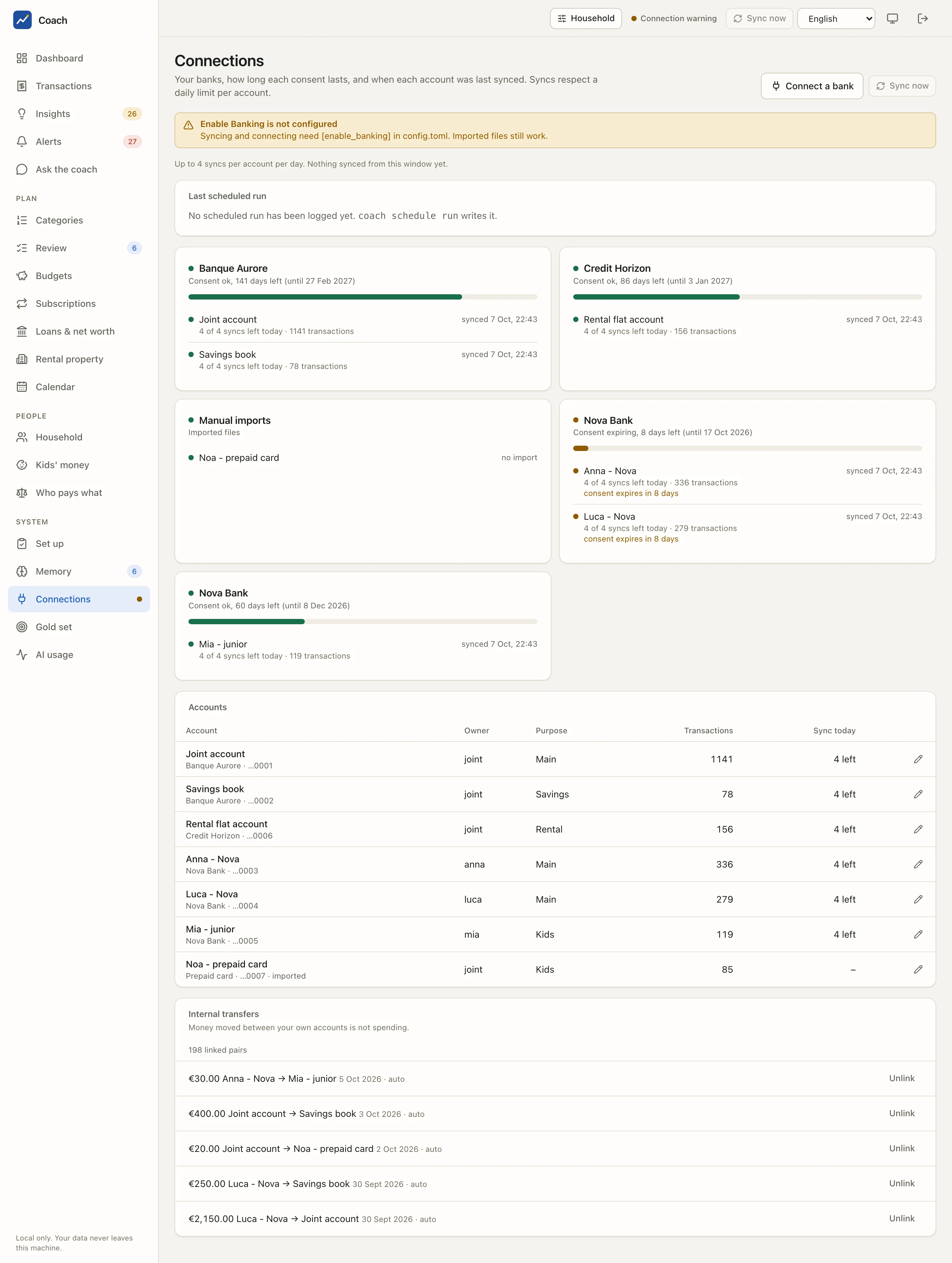
Connections > Connect a bank: choose the country, find your bank, pick the consent length, then Continue to the bank. Log in on your bank's own page; the window finishes by itself. Then Sync now pulls the history.
The app never sees your bank password: you authenticate on your bank's page. The first sync fetches the longest history the bank allows (often 90 days, sometimes up to 2 years).
One consent per bank
A bank allows few concurrent authorisations per application and user. coach connect refuses a second active consent for the same
bank and country unless you pass --replace, because a second one can silently invalidate the first.
Consents expire
A PSD2 consent lasts at most 180 days (the bank may grant less). The coach watches it for you:
| Days left | Status | What you see |
|---|---|---|
| more than 14 | ok |
green on Connections |
| 14 or fewer | expiring |
amber on Connections, a consent alert, a warning in every daily run |
| 3 or fewer | urgent |
red |
| 0 | expired / revoked |
the daily job fails until you reconnect |
To renew, click Reconnect on the bank's card, or:
Reconnecting keeps everything: each account keeps its id, label, owner, purpose and history. When the bank returns new account ids that cannot be matched one to one, the account is flagged "needs review" and nothing is merged silently.
Sync limits
PSD2 caps how often an app may read an account without you being present. The coach keeps under it:
Connections shows "4 of 4 syncs left today" per account. coach sync --force ignores the limit for one run: use it sparingly.
Import files
For a bank you cannot link (a prepaid card, an old account, a bank Enable Banking does not cover), import its export:
coach import --list-profiles
coach import statement.csv --account new:"Prepaid card" --profile generic-csv-fr --dry-run
coach import statement.csv --account new:"Prepaid card" --profile generic-csv-fr
| Format | Notes |
|---|---|
| CSV | Driven by an import profile (TOML in config/import_profiles/): encoding, delimiter, header line, date format, decimal comma, debit / credit columns. Shipped: generic-csv-fr, caisse-epargne-csv, revolut-csv, to verify against a real export. Build your own with the column options and keep it with --save-profile NAME. |
| OFX / QFX | SGML 1.x and XML 2.x |
| CAMT.053 | ISO 20022 XML statements |
Re-importing the same file adds nothing; overlapping files add only the difference. Imported rows go through coach normalize and
coach classify run like any other. PDF statements are not supported.
Tell the coach about each account
Each account has an owner (joint or a household member), a purpose and an optional exclusion. Set them in Connections > Edit
or:
coach accounts
coach accounts set "<label>" --label "Joint account" --owner joint --purpose main
coach accounts set "<label>" --exclude        # kept in the database, left out of every report
Purposes: main, cards, savings, kids, rental. They matter: a loan payment from a rental account is the rental loan, a kids
account belongs to the children's view, and the coach reads a household's money differently from one person's.
Internal transfers
Money moved between your own accounts is not spending. The coach pairs the debit on one account with the credit on another (same amount, a few days apart, a little longer across two banks) and shows the pairs under Internal transfers. Confident pairs are linked; uncertain ones stay proposals:
coach transfers --proposals
coach transfers match --dry-run
coach transfers link OUT_KEY IN_KEY        # settle one by hand
A parent's top-up of a child's account is an internal transfer for the household, and income for the child.
From a Docker container
The redirect URL stays https://localhost:8443/callback. Publish that port on 127.0.0.1 only, for the one command:
Open the printed URL on your host, log in, accept the certificate warning. If that does not work, the copy-paste fallback:
docker compose run --rm coach connect --bank "<bank name>" --country FR --no-server
docker compose run --rm coach finish '<the whole address your browser ends on>'
Paste the address in single quotes, without backslashes. The Enable Banking key is mounted for the setup command only:
docker compose run --rm -v "$PWD/eb.pem:/tmp/eb.pem:ro" coach setup enablebanking, then give /tmp/eb.pem.
See also
- Connections: the page in everyday use
- Docker, "Connecting a bank from a container"
- CLI reference: bank connections, consents, file imports, internal transfers
- Privacy: exactly what goes to Enable Banking (nothing from your database)