Budgets & goals
Monthly envelopes per category or group, with where you will end the month at the current pace, and savings goals that follow real money.
What you see
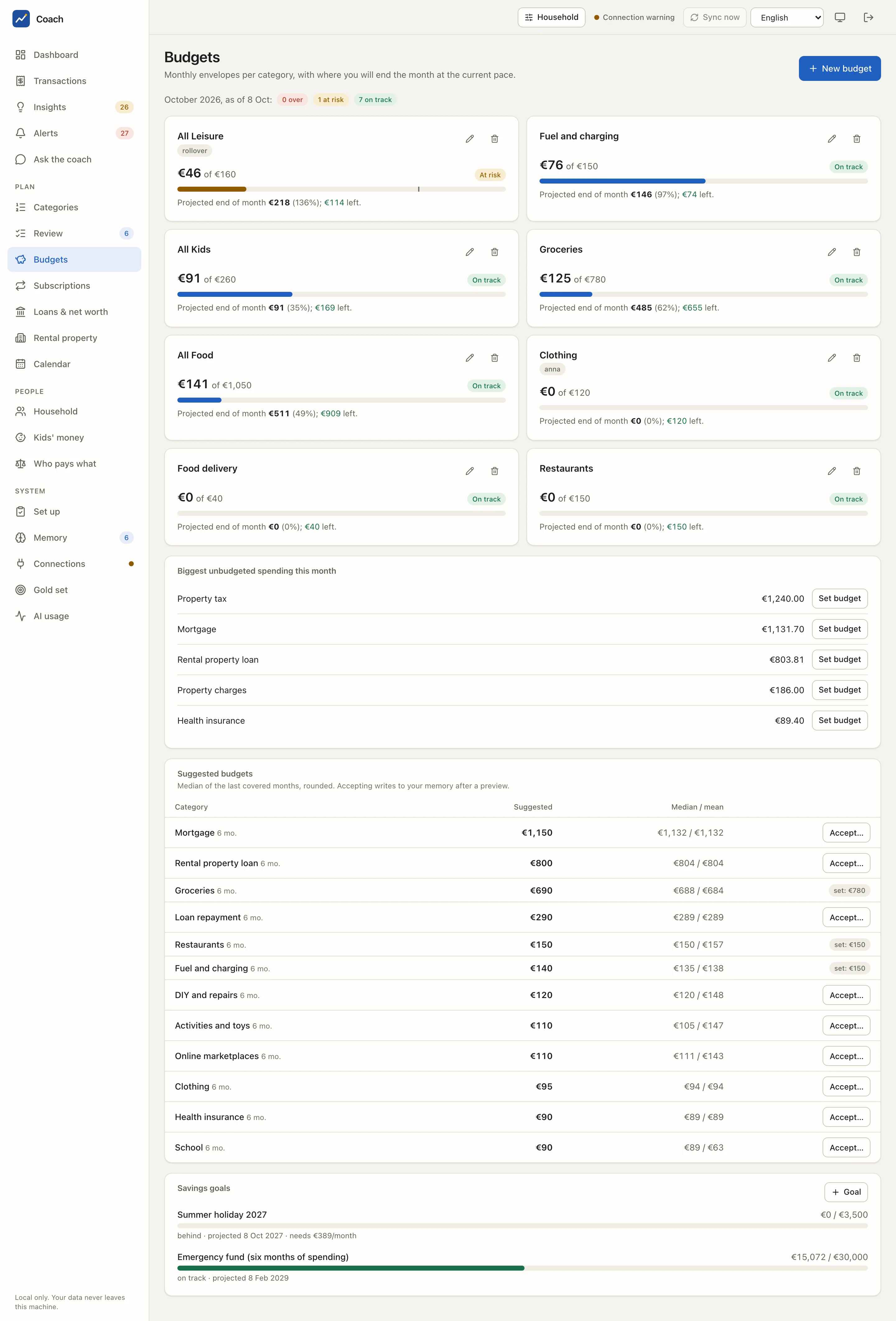
The line under the title sums up the month: "October 2026, as of 8 Oct: 0 over, 1 at risk, 7 on track".
Budget cards
Each card is one envelope: a category ("Groceries") or a whole group ("All Food" covers every food category).
| Part | Meaning |
|---|---|
| €125 of €780 | spent this month against the monthly amount |
| status | On track, At risk (the projection goes past the budget) or Over budget |
| bar and tick | how much is used, and how far into the month you are |
| Projected end of month | where you will land, with the percentage of the budget and what is left |
| rollover | the unspent (or overspent) part of earlier months is carried over |
| a person's name | the budget only counts that person's accounts |
The projection is not a straight line: it adds the recurring payments still to come this month to the pace of your other spending so far (a plain linear pace in the first three days). One-offs are left out and shown apart, so a single big purchase does not break the envelope.
The pencil edits a budget, the bin removes it (with a confirmation). New budget opens the same form: Category or group, Monthly amount (EUR), Roll over what is left (or overspent) to the next month, Only for one person, Only on account, and a Note.
Every change is previewed
The form shows the exact change to your memory file before saving. Budgets live in budgets.yaml, in your household memory, and every
write is recorded in its history.
Biggest unbudgeted spending this month
The largest categories with no envelope. Set budget opens the form pre-filled. Refunds without a category belong to no budget and are mentioned apart.
Suggested budgets
For each category: the Suggested amount, the Median / mean of the last covered months, and how many months it rests on ("6 mo."). The suggestion is the median of the last 6 covered months, rounded (to 5 EUR below 100, 10 EUR below 1,000, then 50 EUR). Accept… shows the diff, then writes the budget. A category that already has one shows "set: €780" instead.
Savings goals
Each goal shows its progress against the target, a status (on track, behind, achieved, overdue, no pace yet, no data), the projected date and, when you are behind, what it needs per month to make the target date.
Goal creates one. A goal follows exactly one source:
| Progress follows | Example |
|---|---|
| An asset | the value of an asset in your memory |
| An account | the balance of a savings account (the emergency fund of the demo) |
| Money tagged… | the transactions tagged with a tag you choose (the summer holiday fund) |
The pace is the average of the last 6 covered months (account or tag) or the Planned per month you entered.
The files behind it
Both live in your household memory and can be edited by hand, from the CLI or from this page.
budgets:
  - id: food-groceries
    category: food.groceries      # or group: food
    monthly: 800
    rollover: true                # carry over the unspent part of earlier months (since start)
    start: 2026-10-01
    owner: joint                  # optional: only the accounts of this owner
    account: Joint account        # optional: only this account (uid or label)
    note: weekly shop at Acme Grocers
Exactly one of category / group, and the category must exist in the taxonomy.
Good to know
- A budget for one person (Only for) counts only that person's accounts; the Household switch in the top bar narrows the view too.
- Rollover counts only the months the contributing accounts fully cover.
- The coach can suggest a budget, but only as a proposal: you accept it yourself in a terminal (
uv run coach memory accept <id>).
From the terminal
uv run coach budget suggest
uv run coach budget status
uv run coach budget set food.groceries 700 --rollover --dry-run   # preview only
uv run coach goals status
uv run coach goals set --help
budget set shows the diff first and writes after a typed yes in a terminal; --propose queues a proposal instead.
See also
- Dashboard: the Budgets card.
- Analytics reference: budgets and goals.
- Memory reference.