Self-host
AI Nutrition Coach is yours to run. The self-host build is the apps/web React
PWA (a Vite build). The container is a static web
server: it serves the app and nothing else. It stores no data, makes no
outbound calls and runs as a non-root user on a read-only filesystem.
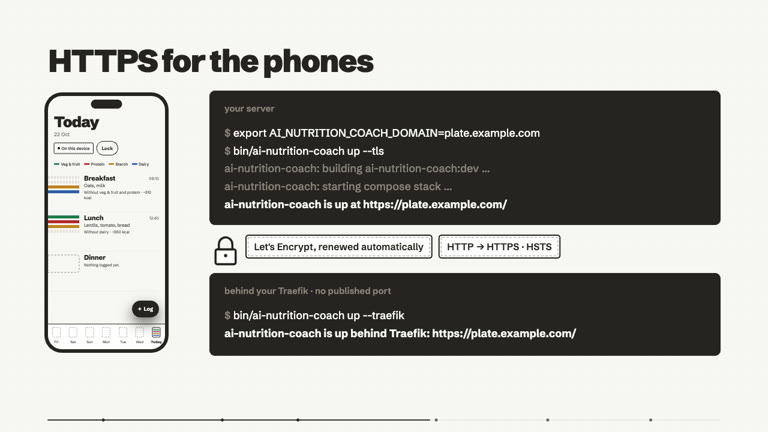
In video
One command, HTTPS for the phones, and a container that holds none of your data.
Quick start (this machine)
bin/ai-nutrition-coach up        # builds the image, serves http://localhost:8080/
bin/ai-nutrition-coach down      # stops and removes it
bin/ai-nutrition-coach works from any directory. Open http://localhost:8080/; the
first screen is "Protect your history" (choose a passphrase), then the Day
Board. Change the port with AI_NUTRITION_COACH_PORT=9000 bin/ai-nutrition-coach up.
By default the port is published on 127.0.0.1 only, so only this machine can reach it.
Reaching it from other devices: HTTPS is required
Plain HTTP over a network is unsupported. AI Nutrition Coach's encrypted web store needs the browser's WebCrypto API (
crypto.subtle), which browsers only expose on a secure context:https://…orhttp://localhost. Opened overhttp://192.168.x.y:8080/the app reports the store as unavailable instead of running unprotected; the camera (barcode, photo) is blocked too, and the service worker (offline use, the update line) cannot register. Plain HTTP would also let anyone on the network rewrite the JavaScript and read your passphrase. Do not expose the plain-HTTP port withAI_NUTRITION_COACH_BIND=0.0.0.0unless something in front of it terminates TLS.
The supported way is the bundled, opt-in Caddy profile. It obtains and renews a
Let's Encrypt certificate automatically, redirects HTTP to HTTPS and adds
Strict-Transport-Security:
Requirements: a DNS name pointing at the host, and ports 80 and 443 reachable
from the internet for the certificate challenge. AI_NUTRITION_COACH_DOMAIN=localhost
gives a local, self-signed trial. The equivalent compose command is
AI_NUTRITION_COACH_DOMAIN=plate.example.com \
  docker compose -f infra/docker-compose.yml --profile tls up -d
Behind your own Traefik
Already run Traefik for HTTPS? Keep the app container local-only and let Traefik route to it:
AI_NUTRITION_COACH_DOMAIN=plate.example.com AI_NUTRITION_COACH_TRAEFIK_CERTRESOLVER=letsencrypt bin/ai-nutrition-coach up --traefik
infra/docker-compose.traefik.yml publishes no port, joins the Docker network Traefik is on
(AI_NUTRITION_COACH_TRAEFIK_NETWORK, default traefik), and adds the router, service and an HSTS-only middleware
as labels; optional overlays add a cert resolver and an ipAllowList. Traefik on the host instead? Use
infra/traefik/ai-nutrition-coach-dynamic.yml with the loopback-published container. Everything — variables,
step-by-step, DNS/certificates, family-only access (and why not basic auth), the CSP knob for the BYOK
endpoint — is in docs/pwa.md.
Behind Authentik (Traefik forward auth, Cloudflare Tunnel)
The same Traefik stack, with a sign-in in front: the setup of a home server where Cloudflare serves HTTPS,
a tunnel (cloudflared) hands the traffic to Traefik over plain HTTP, and Traefik asks Authentik before
anything reaches the app. infra/server.env.example is a complete example:
git clone https://github.com/mmornati/ai-nutrition-coach.git && cd ai-nutrition-coach/infra
cp server.env.example .env       # git-ignored; set the domain, network, entrypoint, middleware names
docker compose up -d --build     # builds infra/Dockerfile from this checkout
docker compose ps                # "healthy" within a few seconds
.env names the three compose files (COMPOSE_FILE) and the project (COMPOSE_PROJECT_NAME):
docker-compose.traefik.yml— the app, no published port.AI_NUTRITION_COACH_TRAEFIK_TLS=falsebecause HTTPS ends at Cloudflare and the tunnel reaches Traefik's HTTP entrypoint (AI_NUTRITION_COACH_TRAEFIK_ENTRYPOINT, e.g.insecure). The browser still sees HTTPS, which the encrypted store needs.docker-compose.traefik-auth.yml— HSTS + your forward-auth middleware (AI_NUTRITION_COACH_TRAEFIK_AUTH_MIDDLEWARE=authentik@file). It has no default: compose refuses to start without it.docker-compose.traefik-authentik.yml— a second router for/outpost.goauthentik.io/on the same host, without the middleware, to Authentik's outpost (AI_NUTRITION_COACH_AUTHENTIK_OUTPOST_SERVICE, a Traefik service pointing athttp://authentik:9000/outpost.goauthentik.io). Authentik finishes the sign-in there.
bin/ai-nutrition-coach up --traefik does the same from environment variables: it adds the two overlays when
the middleware and outpost variables are set.
Updating: git -C .. pull --ff-only && docker compose up -d --build. Installed apps pick the new build up
through their update prompt.
Authentik: with a domain-level forward-auth provider the new host is covered already. With
single application mode, create a Proxy provider (forward auth, single application, external host
https://ai-nutrition-coach.example.org), an Application using it, and add it to the embedded outpost.
Bind the application to the people who should use the app (a group of the household's adults).
Something to check, not verified against a real outpost: the backup relay sends its own
Authorization: Bearer <relay token> header on /sync/v1/*. If the Authentik proxy provider's
Intercept header authentication option is on and the outpost rejects that header, backup will keep
asking to sign in again, however often the person does. Turn that option off for this application.
Cloudflare: Zero Trust → Networks → Tunnels → your tunnel → Public Hostname: the new name, type
HTTP, URL the same Traefik target as your other names.
What the sign-in does and does not do, for this app specifically:
- It controls who may download the app and its updates. There is nothing else on the server: the data is encrypted in each browser and the passphrase protects it, signed in or not.
- The server's AI and backup work behind the sign-in. The app reads
/ai/config.jsonand/sync/config.json, and calls/ai/v1/...and/sync/v1/..., with the session cookie (credentials: 'same-origin', only for this server's own paths: Open Food Facts and a person's own AI endpoint are other origins and never get a cookie). Redirects are still never followed. nginx does not pass that cookie on: the AI proxy forwards no browser header at all, and the relay is sent an emptyCookie. - When the session has expired, the proxy answers those calls with a redirect to the identity provider (or a 401 / 403).
The app does not mistake that for "this server has no AI / no backup": Settings → Your AI and Settings → Your data
say "This server asks you to sign in again. Reload the page to continue." with a Reload button (a failed photo,
voice or coach call says the same line, and a connected device's backup status reads the same and retries). Reload does not
reload in place: once the app is installed, the service worker answers an ordinary reload from its offline cache
without asking the network, so the proxy would never see it. The button instead opens the app's own address with a
?signin=1marker (the#/...screen is kept); the service worker lets exactly that navigation through to the network, never caches the answer, and the proxy asks the person to sign in, as for any page. Once the app has started it removes the marker from the address bar. If the device is offline the network request fails and the app simply opens from its cache again (the notice returns once it can reach the server). The app has no login form of its own. - Once installed, the app opens from its offline cache without asking the proxy, so an expired SSO session is
not noticed until the app first calls the server (an update check,
/ai/config.json, a backup): the update fetch fails quietly and is retried after the next sign-in (open the address in the browser). The service worker never intercepts/ai/,/sync/or/outpost.goauthentik.io/, and never caches a response at run time, so a sign-in redirect always reaches the page as it came and the sign-in callback always reaches Authentik. - Nothing about the Content-Security-Policy changes:
connect-src 'self'already covers these calls. - Behind Cloudflare Tunnel + Traefik, set
AI_NUTRITION_COACH_TRUSTED_PROXIES(below) so the AI and backup rate limits are per person and not one bucket for the whole household. - The web manifest is requested with the session cookie (
crossorigin="use-credentials"), so installation works behind the sign-in. (Plain basic auth is still discouraged — seedocs/pwa.md.) - Forward auth and the IP allow-list overlay both set the router's middlewares: use one of them.
Another reverse proxy (nginx, a tunnel)? Point it at the app, terminate TLS there and add HSTS yourself. If
that proxy runs in a container, 127.0.0.1:8080 is its own loopback, not the app: put both on a shared
docker network and proxy to http://ai-nutrition-coach:8080 (the compose service name).
Run the published image instead of building
Every commit on main whose image passed its checks is published to the GitHub Container Registry
(.github/workflows/ci.yml, then .github/workflows/publish.yml): the image is built, scanned (trivy: no fixable HIGH/CRITICAL) and driven in
WebKit and Chromium (scripts/webkit_smoke.sh) before it is pushed. Nothing in it is specific to a host:
every setting on this page is read by the container at start, so the published image serves your instance as
well as one you build.
| Tag | What it is |
|---|---|
ghcr.io/mmornati/ai-nutrition-coach:edge |
the head of main (never :latest) |
ghcr.io/mmornati/ai-nutrition-coach:X.Y.Z |
a release (vX.Y.Z tag); also :X.Y, and :latest for the highest one |
ghcr.io/mmornati/ai-nutrition-coach:sha-<7> |
one exact commit, to pin or roll back |
Set the image in infra/.env (or the environment) and pull instead of building:
docker compose pull && docker compose up -d # no --build: the compose `build:` section is then unused
With a published image the compose build: section (and its AI_NUTRITION_COACH_PROJECT_URL /
AI_NUTRITION_COACH_RELEASE build arguments) is not used. Do not add --build: it would build this
checkout and tag the result with the registry's name. Updating is the same pull + up -d (a scheduler
such as Coolify's or a nightly cron can run it). Each image carries org.opencontainers.image.revision (the
commit it was built from), a provenance attestation and an SBOM.
The relay image
The encrypted-backup relay is published the same way, from the same
workflow, next to the app image: ghcr.io/mmornati/ai-nutrition-coach-relay, with the same tags
(:edge, :X.Y.Z, :X.Y, :latest for the highest release, :sha-<7>). It is built from infra/Dockerfile.relay,
scanned with trivy (fixable HIGH/CRITICAL fail the build, before anything is pushed) and carries the same
org.opencontainers.image.* labels, provenance attestation and SBOM as the app image. Its run stage holds only node
and the bundle (no npm, yarn or corepack), runs as the unprivileged node user, and works with a read-only root
filesystem.
AI_NUTRITION_COACH_RELAY_IMAGE_TAG=ghcr.io/mmornati/ai-nutrition-coach-relay:edge   # in infra/.env, next to the app's tag
docker compose --profile sync pull && docker compose --profile sync up -d            # no --build
To build it locally instead (a change of your own, or no registry access), leave the variable unset and use
bin/ai-nutrition-coach up --sync, or docker compose --profile sync up -d --build: the default tag is
ai-nutrition-coach-relay:dev, built from your checkout. up --sync always builds, like it does for the app image,
so it is not the command for a pulled image.
Check what you pulled (the images are not signed with a key: the proof is the provenance, which names the workflow and the commit, and the SBOM):
docker buildx imagetools inspect ghcr.io/mmornati/ai-nutrition-coach-relay:edge --format '{{ json .Provenance }}'
docker buildx imagetools inspect ghcr.io/mmornati/ai-nutrition-coach-relay:edge --format '{{ json .SBOM }}'
docker inspect ghcr.io/mmornati/ai-nutrition-coach-relay:edge --format '{{ index .Config.Labels "org.opencontainers.image.revision" }}'
Prefer a :X.Y.Z or :sha-<7> tag over :edge on a server you do not update by hand, and keep the relay and the app
on the same release.
Where your data lives
In your browser, not on the server. Your history is stored encrypted
(ChaCha20-Poly1305 via SQLite3 Multiple Ciphers) in the browser's origin-private file
storage (OPFS) for the site's origin, keyed from your passphrase (see
docs/your-data.md, ADR-0005). Consequences:
- There is no volume to mount and nothing on the server to back up.
(
--with-persistand the old/datavolume never stored anything and were removed.) Redeploying or deleting the container does not touch your data. - Data is per browser and per origin:
http://localhost:8080andhttps://plate.example.comare separate stores. Changing the domain starts an empty store. - Clearing site data or switching browsers loses it. The backup path is the in-app export (CSV/JSON); keep exports somewhere safe.
- A forgotten passphrase cannot be recovered by anyone.
- The one thing that passes through the server is a photo someone chooses to send with the instance-wide AI, if you turned it on: it is relayed, not stored.
- The one thing the server can keep is an opt-in encrypted copy someone chooses to back up with the
relay, if you turned it on: ciphertext in the
sync-datavolume, which you can back up like any file (it exposes no one's data).
Configuration
| Variable | Default | Meaning |
|---|---|---|
AI_NUTRITION_COACH_BIND |
127.0.0.1 |
Host interface for the app port. |
AI_NUTRITION_COACH_PORT |
8080 |
Host port (AI_NUTRITION_COACH_HOST_PORT is a deprecated alias). |
AI_NUTRITION_COACH_DOMAIN |
– | DNS name for --tls and --traefik (required there). |
AI_NUTRITION_COACH_TRAEFIK_NETWORK |
traefik |
--traefik: existing Docker network shared with Traefik. |
AI_NUTRITION_COACH_TRAEFIK_ENTRYPOINT |
websecure |
--traefik: Traefik's HTTPS entrypoint. |
AI_NUTRITION_COACH_TRAEFIK_CERTRESOLVER |
– | --traefik: ACME resolver name (optional overlay). |
AI_NUTRITION_COACH_TRAEFIK_ALLOWLIST |
– | --traefik: comma-separated CIDRs allowed to connect (optional overlay). |
AI_NUTRITION_COACH_TRAEFIK_HSTS_SUBDOMAINS |
false |
--traefik: add includeSubdomains to HSTS. |
AI_NUTRITION_COACH_TRAEFIK_TLS |
true |
--traefik: the router serves HTTPS. false only when HTTPS ends before Traefik (a tunnel). |
AI_NUTRITION_COACH_TRAEFIK_AUTH_MIDDLEWARE |
– | --traefik: forward-auth middleware in front of the app, e.g. authentik@file (optional overlay). |
AI_NUTRITION_COACH_AUTHENTIK_OUTPOST_SERVICE |
– | --traefik: Traefik service of Authentik's outpost, e.g. sso@file; needs the middleware. |
AI_NUTRITION_COACH_CONNECT_SRC_EXTRA |
empty | Extra CSP connect-src origins (see below). |
AI_NUTRITION_COACH_ACCESS_LOG |
off |
nginx access log: off (nothing logged), on (time, method, path; address truncated; no User-Agent / Referer / query), full (whole address). Anything else refuses to start. See Logs. |
AI_PROXY_ENABLED |
0 |
1 offers ONE AI key to everyone on this instance (needs the four below). Off otherwise; see Offer AI to everyone on your instance. |
AI_PROXY_UPSTREAM |
– | The provider's OpenAI-compatible base, https:// only, e.g. https://openrouter.ai/api/v1. |
AI_PROXY_KEY |
– | The provider key. A secret: never in the image or the bundle; rendered at start into a private file. |
AI_PROXY_MODEL |
– | The model every request uses (forced server-side). |
AI_PROXY_LABEL |
the upstream host | What people are told their photos go to after this server. |
AI_PROXY_RATE / AI_PROXY_RATE_ALL |
10r/m / 30r/m |
Request rate per client address (an IPv6 address counts as its /64), and for the whole instance. Both apply. |
AI_PROXY_BURST / AI_PROXY_CONN |
5 / 2 |
Burst allowance, and concurrent requests per client address. |
AI_PROXY_MAX_TOKENS / AI_PROXY_TOKEN_PARAM |
2000 / max_tokens |
Cap on a reply, and the parameter that carries it (max_completion_tokens for reasoning models). |
AI_PROXY_CACHE_MARKERS |
0 |
1 keeps one prompt-cache marker per request on Ask the coach (see AI tiers), for providers that cache only on request (Anthropic or Gemini through OpenRouter). |
AI_PROXY_TRANSCRIPTION |
0 |
1 also offers voice to text for Describe a meal (POST /ai/v1/audio/transcriptions, see Voice to text). Needs the proxy on and a provider with /audio/transcriptions. |
AI_PROXY_TRANSCRIPTION_MODEL |
whisper-1 |
The one model a recording may name (the app reads it from /ai/config.json; any other is refused). |
AI_PROXY_TRANSCRIPTION_RATE / _RATE_ALL / _BURST |
6r/m / 20r/m / 2 |
The voice route's own limits: per client address, for the whole instance, and the burst. Both rates apply. |
AI_NUTRITION_COACH_SW_KILL |
– | 1 serves the service-worker kill switch (escape hatch; docs/pwa.md). |
AI_NUTRITION_COACH_IMAGE_TAG |
ai-nutrition-coach:dev |
Image tag to build/run; ghcr.io/mmornati/ai-nutrition-coach:edge runs the published image (see above). |
AI_NUTRITION_COACH_CONTAINER_NAME |
ai-nutrition-coach |
Container name for plain up. |
bin/ai-nutrition-coach up --compose runs the same container through
infra/docker-compose.yml. If the container name is taken, up stops with a
clear message and exit code 31 (bin/ai-nutrition-coach down first).
Logs
The container logs nothing per request by default (AI_NUTRITION_COACH_ACCESS_LOG=off): the
server holds no user data, and its access log would only record page addresses and
times. Set AI_NUTRITION_COACH_ACCESS_LOG=on to debug: each line is
<address, last octet zeroed> [time] "GET /resolved-file" status bytes (the resolved file: app-shell and deep-link requests log as /index.html). The query string, the
User-Agent and the Referer are never logged, the container's own healthcheck is skipped,
and IPv6 addresses keep at most their first two groups (a /32; anything unrecognised logs as ::). nginx has no built-in
anonymiser, so this is a map of the address rendered at start by
infra/nginx/docker-entrypoint.d/10-render-access-log.sh. full keeps the whole client
address (for a firewall or allow-list problem; turn it off again). The logs go to the
container's stdout, rotated by Docker (json-file, 10 MB × 3). scripts/smoke_self_host.sh
asserts all of this on a real container, and tools/pwa/infra.test.mjs (part of pnpm verify) pins it in the
config. Behind Traefik the client address nginx sees is Traefik's; Traefik's own access log
is the one to look at: see docs/pwa.md.
The project URL
The project URL identifies this deployment to Open Food Facts (browsers forbid setting a User-Agent, so the web
bundle never sends it; it is reserved for the app identity string). It is a build-time setting: for the
container build, docker build --build-arg AI_NUTRITION_COACH_PROJECT_URL=https://… -f infra/Dockerfile .. The
default is the project repository, https://github.com/mmornati/ai-nutrition-coach; set the variable only to point
at a fork. AI_NUTRITION_COACH_BUILD=release AI_NUTRITION_COACH_PROJECT_URL=… node tools/check_project_url.mjs
fails only if the URL is empty or .invalid for a selfhost / release build. It is enforced for release
images: docker build --build-arg AI_NUTRITION_COACH_RELEASE=1 --build-arg AI_NUTRITION_COACH_PROJECT_URL=… runs
it before the web build, and CI does so for every image it tests and publishes (.github/workflows/ci.yml,
.github/workflows/publish.yml), taking the URL from the
repository variable AI_NUTRITION_COACH_PROJECT_URL (optional override, under Settings → Secrets and variables
→ Actions → Variables; left unset, the default above is used). A URL that is set must be a plain https:// URL
(no spaces or quotes); bin/ai-nutrition-coach and the image build refuse anything else.
Content-Security-Policy and your AI endpoint
The app ships a strict CSP, set by nginx on every response: script-src 'self' 'wasm-unsafe-eval' (no inline
script, no CDN; the WebAssembly flag is for the encrypted store's SQLite and the barcode decoder),
style-src 'self' (no inline style either: the build ships its CSS as a file and React applies its
style props through the CSSOM), default-src 'self', object-src 'none', base-uri 'none',
frame-ancestors 'none', form-action 'none', and
This header is the only place connect-src is set (the <meta> CSP in index.html deliberately has none, so
this variable can widen it). Browser requests the app itself makes are limited to this list: barcode lookups
at Open Food Facts, and whatever AI endpoint you configure. This variable is
the place to allow your BYOK endpoint (it works the same behind Caddy, Traefik or
plain up). If you use
"bring your own key" AI (Settings → Your AI), add that endpoint's origin,
otherwise the browser blocks the call:
AI_NUTRITION_COACH_CONNECT_SRC_EXTRA="https://api.openai.com" bin/ai-nutrition-coach up
# several origins are space-separated; a local model works too:
AI_NUTRITION_COACH_CONNECT_SRC_EXTRA="https://openrouter.ai http://localhost:11434"
Trade-off, chosen deliberately: the BYOK endpoint is user-chosen, so the CSP
could simply allow https: — but then any script injected into the page could
send your data to any https server. An explicit, operator-configured allow-list
keeps that exfiltration channel closed; the cost is one environment variable.
The value is validated, in bin/ai-nutrition-coach and again when the container starts:
only space-separated https://host[:port] origins (plus http://localhost[:port])
are accepted. Quotes, ;, *, bare https:, paths and newlines make the
container refuse to start, because the value is written into the CSP header and
must not be able to rewrite the policy.
Offer AI to everyone on your instance
By default each person brings their own AI key (Settings → Your AI). If you run the instance for a household or a small group, you can instead keep one OpenAI-compatible endpoint, key and model on the server, so photo recognition (and, later, coaching) just works for everyone without a key of their own. Off by default.
# infra/server.env  (copy infra/server.env.example to .env; chmod 600 .env)
AI_PROXY_ENABLED=1
AI_PROXY_UPSTREAM=https://openrouter.ai/api/v1
AI_PROXY_KEY=...                       # a secret: never commit it
AI_PROXY_MODEL=google/gemini-2.0-flash-001
AI_PROXY_LABEL=OpenRouter              # optional: what people are told their photos go to
With plain bin/ai-nutrition-coach up export the same variables first (the key is passed to Docker by name, so it is not
in the command line or the output); with compose they come from .env.
What people see. Settings → Your AI gains a choice, Provided by this server; it is the starting choice on a
new install (someone who already chose No AI or their own key keeps their choice). The consent dialog before each
photo says plainly that the photo goes to this server and from there to the provider you named in AI_PROXY_LABEL.
Nothing about it is pressured; No AI stays one tap away. The app learns the offer from GET /ai/config.json, which
says only { "enabled": true, "model": "…", "label": "…", "transcription": false } (plus "transcriptionModel" when voice to text is on; no key, no upstream address) and is never cached or
precached. With the proxy off it says { "enabled": false }.
How it works. nginx, in the same container, answers POST /ai/v1/chat/completions on your own origin (so the
CSP needs no change: connect-src 'self'). It forwards the request to ${AI_PROXY_UPSTREAM}/chat/completions with
Authorization: Bearer <key> added, and it forwards nothing the browser sent: no Authorization, Cookie, Origin,
Referer, X-Forwarded-For or User-Agent (a whitelist of headers, not a blacklist). Per request it also:
- accepts only requests from this site:
Content-Typemust beapplication/json(else415; a cross-site page cannot send that without a preflight, andOPTIONSis refused), aSec-Fetch-Siteheader other thansame-originis a403, and so is anOriginwhose host[:port] differs from theHostheader (Traefik and Caddy keepHost, soX-Forwarded-Hostis not consulted; a proxy that rewritesHostwould need the header kept). The provider's own CORS headers are removed, so another site cannot read a reply either. Refused requests cost nothing; - rewrites the body with njs (the one nginx module the image's base ships with): the model is forced to
AI_PROXY_MODEL, the reply cap is clamped to 1..AI_PROXY_MAX_TOKENS(sent asmax_tokens, or asmax_completion_tokenswithAI_PROXY_TOKEN_PARAMfor reasoning models, which reject the former), and onlymessages,temperature,top_pandresponse_formatare kept (nostream,n,tools, ...);response_formatonly as exactly{"type":"json_object"}or{"type":"text"}(ajson_schemaor any other shape is refused with the generic 400: it is client-sized and outside the 24 KB text budget, and the app never sends one). The input is bounded to what the app sends: at most 8 messages, roles system/user/assistant, content as text or parts of typetext/image_url, at most 24 KB of text in all, at most one image and only as an inlinedata:image/jpeg|png|webp;base64,URI (a remote URL is never forwarded). Acache_controlmarker is dropped unlessAI_PROXY_CACHE_MARKERS=1, and then only one{"type": "ephemeral"}on a text part is kept. Anything else becomes{}, which the provider refuses with a 400 (njs cannot change the status). Someone calling the endpoint directly cannot pick a dearer model, send a long prompt or have the provider fetch a URL; - accepts at most 2 MiB (one downscaled photo is a fraction of that), POST only, and answers
429beyond the rate limits: per client address (default 10 requests a minute, burst 5, 2 concurrent) and for the whole instance (default 30 a minute, 16 concurrent). Behind Traefik or Caddy the client address is the proxy's, so the per-address limit (requests and concurrency) is effectively instance-wide too, unless you configure nginx'sreal_ipfor your proxy (not done here: trusting a forwarded address is a decision for you to make); - talks TLS to the provider and verifies its certificate against the system CA bundle; resolves its name at request time (cached 30 s), so a long-running container follows the provider's DNS; times out just after the app's own 45 s;
- shows no provider text: every provider error is replaced by a generic JSON body (
400stays 400,429stays 429 with itsRetry-After, everything else, a refused or empty-balance key included, becomes a bare502), and the provider's account, project, request-id and rate-limit headers (openai-*,x-request-id, the knownx-ratelimit-*names,Location, cookies) are dropped; - logs no header, body or query string, and upstream failures are logged at
critonly (no client address). The access log is off by default and, when on, never has a query string (see Logs); a rate-limit rejection is logged below the container's log level, so no client address is written.
How the key is protected. AI_PROXY_KEY is read only when the container starts. It is never an image layer, a
build argument, a default or part of the bundle (the image build's secret scan still runs on the bundle; a test pins
that the Dockerfile has no key). At start infra/nginx/docker-entrypoint.d/40-render-ai-proxy.sh validates every value
against a strict pattern (a bad one refuses to start and is never printed), renders the proxy config into a file under
/tmp (a tmpfs, as for the rest of the rendered config) with mode 0600, then verifies that the file is 0600 and
that the key appears in no other rendered file (the access-log format, the headers, the main config). The stock
envsubst step only touches AI_NUTRITION_COACH_* variables, so it never sees the key, and the script passes it to
its renderer through the environment, not a command line. nginx drops the environment from its worker processes. The
key is still in the container's environment, so anyone who can run docker inspect / docker exec on the host can read
it: that is the same trust as reading .env.
Calls per coach interaction (AI coaching). Every AI coach text is checked a second time by the same AI before it is shown (ADR 0008, AI tiers), so a coach note costs 2 requests, a chat turn in Ask the coach 3 (the question is checked, answered, and the answer checked) and the weekly paragraph 2; each is a short call (a reply of at most 200 tokens for the check; the chat question and the previous exchange go with it, nothing else about the person). A model that cannot answer the check in the expected JSON (for example a reasoning model that spends its tokens thinking, or one that rejects a temperature setting more than once) will never get a coach text shown: the app leaves out a temperature the provider refused, and after three unreadable checks in a row it says so in Settings, Your AI. Choose a model that follows a plain JSON instruction. That is roughly double to triple the requests of before, against AI_PROXY_RATE (default 10r/m per client address, burst AI_PROXY_BURST 5) and AI_PROXY_RATE_ALL (default 30r/m for the instance): one chat turn fits in the burst, but a few turns a minute, or several people behind one proxy address, can meet a 429, which the app shows as "busy". The app serialises note upgrades and stops them for a minute after a 429, but a limit set for one person will feel tight for a household: consider AI_PROXY_RATE=20r/m and AI_PROXY_RATE_ALL=60r/m (and size your provider budget for the extra calls). The check cannot be turned off in the app, and when it cannot run (a limit, an error, a timeout) the text is not shown.
Cost and abuse: read this. Anyone who can reach the instance can use this key, within the rate limit. The limit is
per client address as nginx sees it: behind Traefik or Caddy that address is the proxy's, so in effect it caps the
whole instance (10 requests a minute by default, which is a ceiling on spend, not a fairness rule between people),
unless you set AI_NUTRITION_COACH_TRUSTED_PROXIES (Behind a reverse proxy).
Therefore:
- Put the instance behind a sign-in or an allow-list if it is reachable from the internet: the Traefik overlays
docker-compose.traefik-auth.yml/-authentik.yml(forward auth) or-allowlist.yml(CIDRs) already in this repository (Behind Authentik, Behind your own Traefik). Forward auth covers/ai/and/sync/too, because they are the same host: the app sends the sign-in session cookie with its calls to its own/ai/*and/sync/*paths (and to nothing on another origin), so the proxy lets them through for a signed-in person. Do not exempt/ai/or/sync/from the sign-in to "make them work": that would open the key-bearing AI relay and the backup relay to the Internet. - Set a spend limit at the provider (a monthly cap or a prepaid balance), and use a key created for this instance.
- Know the limits of the model lock: njs forces the model, caps the reply and bounds the input (messages, text, one
inline image), but it cannot tell a photo question from any other question, so a visitor can still ask the model
anything within those bounds, at the rate limits above. The nameserver nginx uses is the first plain address in
/etc/resolv.conf(orAI_PROXY_RESOLVER); it ignores/etc/hostsand Docker's--add-host, so the provider's name must resolve through DNS. - The provider sees the photo and the instruction coming from your server, not from the person's device; the person's internet address stays with your server. Whoever runs the server chooses the provider and answers for it: the consent dialog says so.
Turn it off by unsetting AI_PROXY_ENABLED (or the key) and restarting. A missing key with AI_PROXY_ENABLED=1 leaves
the AI off and says so in the container log. Rotating the key is a restart with the new value; nothing in a browser
needs to change.
Per-person limits behind single sign-on
The AI proxy's rate and connection limits are per client address. Behind a reverse proxy that is the proxy (or, with
AI_NUTRITION_COACH_TRUSTED_PROXIES, the visitor's internet address, which can be shared by a whole household or
change on a phone), so one noisy person can spend everyone's allowance. If a forward-auth sign-in such as Authentik
sits in front, you can key the limits on the signed-in person instead, and give each person and the instance a
daily request budget. Both are opt-in and off by default.
| Variable | Default | |
|---|---|---|
AI_PROXY_USER_HEADER |
unset | The request header your sign-in sets to the user, e.g. X-authentik-username. Letters, digits and hyphens, at most 64; a name this server uses for something else (Host, Authorization, Cookie, X-Forwarded-For / -Host / -Proto, X-Real-IP, CF-Connecting-IP, Origin, Content-*, Sec-* ...) is refused at start. Set, it is the key of the per-caller rate limit and connection cap (instead of the address) and of the daily budget. Unset: everything stays per address. |
AI_PROXY_DAILY_PER_USER |
0 (off) |
Requests one person (or, with no header, one client address) may send per UTC day, 0 to 999999. |
AI_PROXY_DAILY_TOTAL |
0 (off) |
Requests the whole instance may send per UTC day, 0 to 9999999. |
Trust. The header is believed only when the connection comes from one of AI_NUTRITION_COACH_TRUSTED_PROXIES
(the direct peer, checked with a geo on the peer address that 45-render-real-ip.sh renders from the same list as
real_ip), so set that variable too (Behind a reverse proxy); with
it unset the container says so at start and every caller stays keyed by address. A request from any other peer has the
header ignored, so reaching the app container without going through the proxy cannot make you someone else. Your
forward-auth middleware must overwrite the header on every request, never append to it: Authentik's Traefik
middleware does so through authResponseHeaders, which replaces whatever the visitor sent:
http:
  middlewares:
    authentik:
      forwardAuth:
        address: http://authentik:9000/outpost.goauthentik.io/auth/traefik
        trustForwardHeader: true
        authResponseHeaders:
          - X-authentik-username    # ... then AI_PROXY_USER_HEADER=X-authentik-username
The value (1 to 128 characters) is a rate-limit key and is hashed (SHA-256, 64 bits kept) before the daily counter is stored; it is never logged and always removed before the request goes to the provider (which, as above, never receives any header the browser sent). A trusted request without the header, or with an empty one, falls back to the address key.
Daily budgets. Counters live in nginx's shared memory (njs js_shared_dict_zone, njs 1.0.x as shipped with the
pinned nginx image; 256 KB with evict, so a full zone drops its oldest counters instead of refusing everyone, and
every counter expires 26 hours after its last update). Keys are the UTC day plus the hash of the person, and the day
plus * for the instance. They are not persisted: restarting the container resets today's counts, and with
several app replicas each counts alone. Over a budget, the request gets 429 with {"error":"ai_daily_limit"} and a
Retry-After of the seconds left until 00:00 UTC. What counts: a request that passed every local check (method, type,
origin, size, the per-minute limits, the njs validation of its shape) and so goes to the provider, whatever the
provider then answers, because the provider may have billed it, and a voice request counts as one request like a chat
one. Requests refused locally (415, 403, 413, the rate limits, an invalid body) and requests refused for a budget do
not count. A person who is under their own budget but meets a spent instance total gets the same 429 and is not
charged for it.
Choosing values. A coach interaction is 2 to 3 requests (the text and its second-pass check; Ask the coach 3; a
photo or a voice note is one more), and one very active person might make 40 to 100 of them a day. AI_PROXY_DAILY_PER_USER=300
is generous for a person yet a hard stop for a runaway client; AI_PROXY_DAILY_TOTAL=1500 suits about five people.
Set the total from what you are willing to pay on the worst day, and keep your provider spend cap as the final stop.
In the app: a 429 whose Retry-After is more than two hours away (a daily budget; the proxy sets it to the seconds until
midnight UTC) is shown as "The AI on this server has been used up for now. It is available again later." with no
countdown; a shorter one (the rate limit) stays "busy, try again in a moment". In the last two hours before midnight UTC a spent
budget therefore still reads "busy".
Provider key from a file
AI_PROXY_KEY_FILE names a file that holds the provider key, so it need not sit in the container's environment (and
docker inspect). It is meant for Docker secrets with the compose files:
# infra/docker-compose.override.yml, next to docker-compose.yml
services:
  ai-nutrition-coach:
    environment:
      AI_PROXY_KEY_FILE: /run/secrets/ai_proxy_key
    secrets:
      - ai_proxy_key
secrets:
  ai_proxy_key:
    file: ./ai_proxy_key.txt    # chmod 644 (or readable by uid 101); the key and nothing else
The file is read once at start; surrounding whitespace (the final newline) is trimmed, and the content is validated like
AI_PROXY_KEY (a bad one refuses to start; the message never shows it). A missing, unreadable, empty or larger-than-1 KiB
file refuses to start too. If both AI_PROXY_KEY_FILE and AI_PROXY_KEY are set, the file wins and the start-up
log says so (naming the two variables). It is then rendered exactly like the variable: one 0600 file under /tmp. The
plain docker run mode of bin/ai-nutrition-coach up does not mount files: use AI_PROXY_KEY there, or --compose.
Voice to text (Describe a meal, by voice)
Describe a meal lets a person say what they ate. With their own key the recording goes to their endpoint's
/audio/transcriptions (Whisper-compatible; the model is set in Your AI, default whisper-1). On this server's AI
it goes through the proxy, only if you turn this on:
AI_PROXY_TRANSCRIPTION=1              # default 0: the route does not exist (404)
AI_PROXY_TRANSCRIPTION_MODEL=whisper-1
#AI_PROXY_TRANSCRIPTION_RATE=6r/m  AI_PROXY_TRANSCRIPTION_RATE_ALL=20r/m  AI_PROXY_TRANSCRIPTION_BURST=2
It needs a provider that offers /audio/transcriptions under AI_PROXY_UPSTREAM (OpenAI does; many OpenAI-compatible
gateways do not). If yours has none, leave it off: the app then offers no microphone button on this server (it reads
"transcription": false from /ai/config.json; with it on the file also names transcriptionModel). Typing, and the
keyboard's own dictation, always work.
POST /ai/v1/audio/transcriptions is handled like the chat route, with its own tighter limits: POST only; same origin
only (Sec-Fetch-Site and Origin checked, 403 otherwise); Content-Type must be multipart/form-data (415); the
body at most 1 MiB (413; a 30 s recording is about 120 KB); 429 beyond 6 requests a minute per client address
and 20 a minute for the whole instance (burst 2, both configurable, validated at start); the key is added server-side
and the browser's headers are not forwarded (only the multipart Content-Type, which carries the boundary); the
provider's headers are removed and its errors become generic JSON bodies; upstream failures are logged at crit only.
The model is forced by validation, not by rewriting. A multipart body holds binary audio, which njs cannot rewrite
safely (it has no byte-preserving string type and a round trip through text corrupts audio). So the njs script
(ai-proxy.js, txGate) parses the body as bytes and lets it through, unchanged, only if it holds exactly one
file part (an audio or video blob with a plain file name), exactly one model part equal to
AI_PROXY_TRANSCRIPTION_MODEL, and optionally a short language and response_format=json. Any other model, any
other part (prompt, temperature, timestamp options, a repeated part), a malformed or truncated body or a header
smuggled into a field gets the generic 400 and never reaches the provider. The cost of a call is therefore bounded
by the single configured model, 1 MiB of audio and the rate limits above. As for chat, the voice limits are per address
as nginx sees it: behind a reverse proxy that is the proxy's address, so they are effectively instance-wide.
What the provider receives: the recording (not stored by this app or by this server's software), the model name and the app's language code. What this server logs: nothing of it. Who can spend the key is the same story as for chat: put the instance behind a sign-in or an allow-list.
scripts/smoke_self_host.sh runs the real container twice for this: with the proxy off (/ai/config.json says
{"enabled":false}, /ai/v1/chat/completions is a 404, no proxy_pass exists in the rendered config) and with it on
against a throw-away local HTTPS upstream that reports whether the browser's Authorization header or cookie reached it
and what the injected key looked like. tools/pwa/infra.test.mjs pins the rendered config and the script.
Encrypted backup on your own server
Off by default. The app container stays a static server with no data. If you also run the relay
(apps/relay), people on your instance can keep an encrypted copy of their data on it: to restore on
a new phone or after clearing a browser, and to use the app on more than one device
(your-data.md). The relay stores ciphertext it cannot read
(plus each person's handle, a salt, a wrapped key and a keyed hash of a value derived from their
passphrase); there is no OpenPlate-owned server, ever.
bin/ai-nutrition-coach up --sync          # app on 127.0.0.1:8080 + the relay (implies --compose)
bin/ai-nutrition-coach up --tls --sync    # + Caddy, automatic HTTPS (needed from other devices)
bin/ai-nutrition-coach up --traefik --sync
That builds a second image from your checkout (infra/Dockerfile.relay: Node 24, pinned by digest, one
bundle, no runtime dependencies, non-root, without npm, yarn or corepack) and starts the compose
profile sync. The same image is also published next to the app image
(ghcr.io/mmornati/ai-nutrition-coach-relay, see below); up --sync always builds from
your checkout, which is what you want when you changed something, and the published image is for a server
that pulls. With the compose files directly (docker compose up -d --build in infra/, as in
Behind Authentik), set COMPOSE_PROFILES=sync and
AI_NUTRITION_COACH_SYNC=1: the relay service has its own build: section, so --build builds both images. By hand: set AI_NUTRITION_COACH_SYNC=1
for the app container (it then proxies /sync/ to the relay) and run
docker compose -f infra/docker-compose.yml --profile sync up -d. The proxy is the same origin, so the
Content-Security-Policy does not change; nothing but /sync/config.json and /sync/v1/... (salt, signup, login, recover, vault, account, passphrase,
recovery, devices, delete) is proxied, everything else under /sync/ is a 404.
| Variable | Default | |
|---|---|---|
SYNC_SIGNUP |
invite |
invite (a new copy needs an invite: a single-use one made with the admin CLI, or one of SYNC_INVITE_CODES, comma-separated, which are reusable and so discouraged), open (anyone who can reach the server can create a copy) or closed. Existing handles can always log in. With invite, no static code and no unused invite the relay still starts, refuses new signups (/sync/config.json then says closed; it says invite again as soon as you create one) and logs one line at start: relay: new signups are closed until invite codes are set (SYNC_INVITE_CODES, ornode /app/relay.mjs admin invites create), or SYNC_SIGNUP=open; existing handles can still log in. Before this default changed (it used to be open), a relay started without SYNC_SIGNUP accepted any signup; set SYNC_SIGNUP=open to keep that. |
SYNC_TOKEN_MAX_IDLE_DAYS |
180 |
A device token that has not been used for this many days stops working (checked when it is used, and the row is dropped). 0: never. The device is told plainly that it was disconnected and offers to connect again with the handle and passphrase. |
SYNC_KEEP_PREVIOUS_HOURS |
24 |
The version kept as "the one before" is only replaced by a later write once it is this old. A stolen token cannot wipe both versions within minutes. 0: every write moves it (the behaviour before S4). |
SYNC_MAX_VAULT_MB |
20 |
The largest encrypted copy, 1 to 24. nginx's body limit follows it. |
SYNC_MAX_VAULTS |
50 |
Handles this relay will hold. |
SYNC_MAX_DEVICES |
20 |
Device tokens kept per handle (the one used least recently is dropped). |
SYNC_MAX_UPLOADS |
3 |
Vault writes the relay reads at the same time; signups have their own pool of half that (at least 1), and one client address holds at most one slot per pool. The others are told to come back in a few seconds. A body must arrive within about 10 s plus its size at 64 KiB/s (60 s at most) or it is dropped. Each can hold a whole vault in memory, so keep it small on a small host. |
SYNC_RATE_IP / SYNC_RATE_HANDLE / SYNC_RATE_SIGNUP / SYNC_RATE_WRITE |
30 / 10 / 5 / 60 | Per minute per address (salt, login and signup together; an IPv6 address counts as its /64), failed logins per minute per (address, handle) (for IPv6 the address is its /48; a lockout holds only the client that failed), signups per hour per address, uploads per minute per device. A handle being guessed at is also slowed, up to 2 s per login. |
SYNC_RATE_HANDLE_DAY |
20 | Failed logins per handle per 24 h from everyone together. Past it, logins for that handle are refused (429) until the window ends, unless the request carries a valid device token of that same vault (devices already connected never log in again, so they are unaffected). A brand-new device (restore or join) cannot sign in while a handle is under attack: raise the value if your people mistype often, lower it if you want a harder stop. Known and unknown handles behave identically. |
SYNC_SERVER_SECRET |
generated | Optional. By default 32 random bytes are written to server.secret (mode 0600) in the data volume at the first start. |
Your data. SQLite lives in the named volume sync-data (/data in the container): relay.sqlite
(and its -wal/-shm) and server.secret. Back it up with the container stopped, or with
sqlite3 relay.sqlite ".backup ...", together with server.secret (without it, stored proofs and
fake salts no longer match and people cannot log in). The volume holds ciphertext, handles, salts, wrapped
keys and keyed hashes only, so a plain file backup of it exposes no one's data. bin/ai-nutrition-coach down
stops the relay but keeps the volume.
What it does not log. Nothing about a request: no address, handle, size or path (one line at start).
nginx's own access log follows AI_NUTRITION_COACH_ACCESS_LOG as for the rest of the app.
Limits worth knowing. Rate limits are per address as the relay sees it (nginx sets X-Real-IP, so
behind Caddy or Traefik that is the proxy unless you set AI_NUTRITION_COACH_TRUSTED_PROXIES
(below); without it everyone shares
a bucket, as with the AI proxy, and so does the cap nginx puts on requests in flight per address). Signup tells a person that a handle is taken (the usual trade-off; use
SYNC_SIGNUP=invite|closed to bound it); login never says whether a handle exists. A handle that is being guessed at from many addresses stops accepting logins from devices that have no token (SYNC_RATE_HANDLE_DAY), so a stranger cannot grind through passphrases; the price is that someone restoring onto a new device waits for the attack to stop (at most a day). Identity is the handle:
a vault is not bound to your Authentik user (a known limit, see below). People change the passphrase of their copy,
list and sign out their devices, make or rotate a recovery key and delete their copy from Settings, Your data; you
list, delete and prune copies with the admin CLI.
Sharing the instance with other people
A family or a few friends on one server, with Authentik in front. Nothing here adds accounts: the relay never learns who anyone is, and each person's data stays locked with their own passphrase.
1. The sign-in in front. Put the whole app behind your forward-auth, as in
Behind Authentik. The app sends the sign-in cookie to its own
paths (/ai/, /sync/), so the AI and the backup work behind it.
2. Trusted proxies. Set AI_NUTRITION_COACH_TRUSTED_PROXIES and AI_NUTRITION_COACH_REAL_IP_HEADER
(above) or every limit is one bucket for the whole family.
3. AI per person. AI_PROXY_USER_HEADER=X-authentik-username makes the AI rate limit and the daily budget per
person (Per-person limits behind single sign-on). The header is believed only from
a trusted proxy, and your forward-auth middleware must overwrite it (Authentik's authResponseHeaders does).
Example values: AI_PROXY_DAILY_PER_USER=300, AI_PROXY_DAILY_TOTAL=1500.
4. Invites, one per person. Signups are invite by default. Make a single-use, labelled code for each person
and give it to them:
docker compose exec sync-relay node /app/relay.mjs admin invites create --label "Anna" --count 1
docker compose exec sync-relay node /app/relay.mjs admin invites list
docker compose exec sync-relay node /app/relay.mjs admin invites revoke 3
The code is printed once; only a keyed hash is stored, with the label, when it was made and used and by which handle. It
is spent by the signup that succeeds (a handle that is taken does not burn it). SYNC_INVITE_CODES from the
environment still works, but those codes are reusable credentials: prefer the CLI.
5. The admin CLI. It runs inside the relay container on the data volume and never over HTTP (there is no admin
web page). Add --json for machine-readable output.
docker compose exec sync-relay node /app/relay.mjs admin list            # handle, size, version, created, updated, last device use, devices, recovery key (yes/no)
docker compose exec sync-relay node /app/relay.mjs admin stats
docker compose exec sync-relay node /app/relay.mjs admin delete anna --yes
docker compose exec sync-relay node /app/relay.mjs admin prune --idle-days 365          # dry run: lists
docker compose exec sync-relay node /app/relay.mjs admin prune --idle-days 365 --yes    # deletes
Nothing expires by itself: a copy is never deleted unless you run delete or prune --yes. prune counts a vault as
idle when it has had no write and no device use for that many days. bin/ai-nutrition-coach admin <command> does the same through whichever compose stack is running the relay (for example bin/ai-nutrition-coach admin invites create --label Anna).
6. What each person sets up. Open the app on the server's address (signing in through Authentik), choose a passphrase for the device, then Settings, Your data, Back up to this server: a handle, a passphrase for the copy (at least 12 characters in one piece, 16 with spaces, or four words of three letters or more, not a common one: you could try guesses offline, so a weak one defeats the point), and the invite code. The app then shows a recovery key once; they write it down. On another device they choose "Restore from this server" (or "Connect to this server's copy" in Settings) with the handle and passphrase, or the recovery key if they lost the passphrase.
7. What you can and cannot see. You can see: handles, how big each copy is, when it last changed, how many devices it has and whether it has a recovery key, the labels they gave their devices ("iPhone · Safari"), the invite labels you chose, and with the access log on, their address. You cannot see: what they ate, their notes, their profile, their passphrase, their recovery key or their AI key; a copy is ciphertext. Whoever runs the server could try passphrase guesses offline against a stolen copy (each costs a 64 MiB Argon2id run), which is why the app refuses weak ones. A server you operate can also serve a modified app: people who do not trust you should not use your server (true of every web app).
Known limits (not built). A vault is not bound to the Authentik identity: anyone signed in on the instance can try to create or log into any handle (rate limited), and a person who forgets which handle is theirs cannot be looked up by username. One profile per browser (a shared browser has one store). No admin web page: the CLI is the tool.
Behind a reverse proxy: the real client address
Behind Traefik, Caddy or cloudflared, every request reaches the app container from the proxy's address, so every
per-address limit (the AI proxy's rate and connection limits, the backup relay's connection cap and the address it
limits signups and logins on) is one bucket for everyone: five signups an hour for the whole household, and an
"AI limit per person" that is really the instance limit. Opt in to reading the real address:
| Variable | Default | |
|---|---|---|
AI_NUTRITION_COACH_TRUSTED_PROXIES |
unset | Comma-separated addresses or CIDRs of the proxies whose header may be believed, e.g. the proxy container's own address (docker inspect) or a network used only by the proxy and the app. Avoid trusting a whole shared subnet such as 172.18.0.0/16: any other container on it could then choose the address every limit is keyed on. Unset or empty: off, nginx behaves exactly as before. Ranges that broad are refused (IPv4 prefixes shorter than /8, IPv6 shorter than /16, so 0.0.0.0/0, ::/0 and 0.0.0.0/1 are all out). At most 32 entries. |
AI_NUTRITION_COACH_REAL_IP_HEADER |
X-Forwarded-For |
X-Forwarded-For, CF-Connecting-IP or X-Real-IP. Behind a Cloudflare Tunnel use CF-Connecting-IP: Cloudflare sets it and Traefik passes it through. Used only when the connection comes from a trusted proxy. CF-Connecting-IP (like X-Forwarded-For) can be trusted only when the app is reachable exclusively through that proxy or tunnel: if the port or a second route is open to anyone else, a visitor can send the header themselves. |
45-render-real-ip.sh renders these into set_real_ip_from (one per entry), real_ip_header and real_ip_recursive on
at container start, into /tmp like the other rendered files. Every value is validated against a strict pattern and a
bad one refuses to start (the message names the variable, never the value), like AI_NUTRITION_COACH_CONNECT_SRC_EXTRA.
List only peers that really are your proxy, and make sure nothing else can reach the app container's port: whatever a
trusted peer puts in the header is believed. With X-Forwarded-For, the list is read from the right, past every trusted
proxy, so a visitor cannot prepend an address of their own. The address is used for rate limits and connection caps
only; with AI_NUTRITION_COACH_ACCESS_LOG=on it also appears (truncated) in the access log, which is then the client's, not the proxy's.
Caddy
The caddy service runs as root inside its container (binding 80/443 and
writing the certificate volume), with every capability dropped except
NET_BIND_SERVICE, a read-only root filesystem and no-new-privileges. It
serves HTTP/1.1 and HTTP/2 only (HTTP/3 would need 443/udp), and hides
Server / Via.
Container hardening
bin/ai-nutrition-coach and infra/docker-compose.yml run the image (nginx-unprivileged,
uid 101, port 8080) with --read-only, a small tmpfs on /tmp (the only place
nginx writes), --cap-drop ALL and no-new-privileges. Every response, including worker and wasm
responses and nginx's own error pages, carries nosniff, Referrer-Policy: no-referrer,
X-Frame-Options: DENY, a Permissions-Policy that allows only the camera for the app's own origin,
COOP/CORP same-origin and the CSP; the server version is hidden. Caching follows Vite's output:
index.html, boot-guard.js, manifest.webmanifest, sw.js and precache-manifest.json are revalidated
(no-cache) so upgrades take effect immediately (sw.js and the precache manifest are the installed app's way of
learning that a new version exists, docs/pwa.md); Vite's content-hashed assets/* and the
versioned sqlite3mc/<ver>/ engine, zxing/<ver>/ decoder and argon2/<ver>/ key-derivation build are immutable; fonts, icons and licence texts
(unhashed names) are cached five minutes and revalidated. A missing file is a real 404, never the app shell;
only a path without a file extension (a route) falls back to index.html.
Updating, and the kill switch
Deploy a new image and restart; installed apps show a calm "A new version is ready" line
(docs/pwa.md). Changing AI_NUTRITION_COACH_CONNECT_SRC_EXTRA and restarting is also
a new version (the service-worker build id covers the rendered headers). If a bad build gets stuck on
phones, start the container with AI_NUTRITION_COACH_SW_KILL=1: it serves a worker that deletes every cache
and reloads each open window once, without touching your data
(docs/pwa.md). The container refuses to start
if the bundle has no sw.js / precache manifest.
Camera and barcode scanning
Scanning is decoded entirely on the device. The browser's native BarcodeDetector is
used where it exists (Chrome on Android, macOS and ChromeOS; Edge/Opera on macOS). Everywhere
else — Safari/iOS, Firefox, Chrome/Edge on Windows and Linux — the app uses a
zxing-wasm decoder served from your own origin (zxing/<version>/, fetched at build time by
scripts/fetch_web_zxing_pwa.sh, SHA-256 verified): nothing is downloaded from a third party and
the camera never leaves the device. Only if the decoder cannot start does the scanner say
"Scanning isn't available in this browser" and offer manual entry. The camera needs HTTPS (see above).
Fonts
Barlow is bundled (fonts/, SIL OFL) and served from your own origin. A glyph it lacks (emoji, CJK and
other scripts) falls back to the system font; nothing is fetched from a CDN. Font and library licences are
listed under Settings → About.
Verifying a build
- digest-pinned base images (the
nodebuild stage,nginxinc/nginx-unprivileged,caddy), strict-lockfile install; - readiness (polling, no fixed sleep), HTTP 200, SPA deep links, 404 for missing
assets, 405 for
POST; sqlite3mc/<ver>/sqlite3.wasmserved asapplication/wasm,immutable;.mjsastext/javascript; Vite's hashedassets/*immutable; a missing file is a 404;- CSP and the other headers on html, js, css, worker, wasm, manifest and icon responses; no version in
Server; no'unsafe-inline'(script or style), no blankethttps:; - every file of
precache-manifest.jsonis served with exactly the SHA-256 it lists, and the boot-critical files (document, boot guard, store worker, sqlite3mc, zxing, argon2) are listed; - container is non-root, read-only, capabilities dropped, no-new-privileges;
- the container boots and serves on a docker
--internalnetwork with no outbound route (and a deliberate outbound request there fails), i.e. the server needs no outbound network, and its rendered nginx config contains noproxy_pass/resolver(this is a self-containedness check, not a packet capture); - the access log is off by default (the requests above left no line), and with
AI_NUTRITION_COACH_ACCESS_LOG=ona request with a distinctive User-Agent, Referer and query string is logged as the resolved file only, with a truncated address; an invalid value refuses to start; - hostile
AI_NUTRITION_COACH_CONNECT_SRC_EXTRA/AI_NUTRITION_COACH_DOMAINvalues are rejected; - the Traefik compose renders with no published port, the expected labels (HSTS-only middleware),
optional overlays and refusals of hostile Traefik settings;
sw.js,precache-manifest.jsonandmanifest.webmanifestareno-cacheand agree on the build id; the zxing decoder is served andimmutable; the kill switch serves the kill worker; - a name collision is reported clearly; compose binds loopback by default;
- the shipped bundle references no third-party host
(
tools/check_no_external_hosts.sh: no CDN; the engine, decoder and fonts are served from your origin).
bash scripts/webkit_smoke.sh then drives the same image in WebKit and Chromium
(docs/pwa.md).
Where things live
infra/Dockerfile               multi-stage: node 24 LTS alpine (digest) + pnpm → nginx-unprivileged (digest)
infra/nginx/nginx.conf         main config (everything writable lives in /tmp)
infra/nginx/templates/         vhost + shared security-header include (envsubst at start)
infra/docker-compose.yml       hardened app service + opt-in `tls` profile (Caddy)
infra/docker-compose.traefik*.yml  behind your Traefik: no published port (+ cert-resolver / allow-list /
                               forward-auth / Authentik-outpost overlays)
infra/server.env.example       `.env` for Traefik + Authentik behind a Cloudflare Tunnel
infra/traefik/                 file-provider example for a Traefik running on the host
infra/Caddyfile                automatic HTTPS + HSTS for $AI_NUTRITION_COACH_DOMAIN
bin/ai-nutrition-coach                  the one-command affordance
scripts/smoke_self_host.sh     CI / local smoke test of the image
scripts/webkit_smoke.sh        real-browser smoke of the image (WebKit + Chromium)
tools/generate_precache_manifest.mjs  sw.js + precache-manifest.json for the Vite bundle
tools/check_no_external_hosts.sh  built-bundle third-party host scan
What's NOT in v1
- Server accounts beyond a handle, a recovery key, a device list. The optional encrypted-backup relay (above) restores a device and keeps several devices in step (they pull on unlock and focus; an unchanged copy is a cheap "not modified"); the recovery key, device list and revoking, deleting the copy from the app and single sign-on are phase S4.
- Server-side accounts or readable storage — by design. The relay holds a person's handle and ciphertext, nothing it can read.
A note on health data (not legal advice)
The profile can hold a weight, a height and a waist, and the app holds what a person eats. A weight together with what someone eats is health data under GDPR Article 9. If you host the app for yourself or your own household, that is personal use. If you host it for other people, you are likely a controller for what they entrust to it and you need their explicit consent, among other duties. The server only ever sees ciphertext (the optional relay stores an encrypted vault it cannot read), but the note applies all the same. This is not legal advice; ask someone qualified where you are.
Telemetry
The self-host image ships with no telemetry (FR-12): the served bundle makes no
analytics or tracking calls, the server needs no outbound network (unless you turn on the optional
instance-wide AI, which needs outbound HTTPS to your provider), and the only
browser network paths are the ones you enable (barcode lookups, an AI endpoint
you configure, the AI your server offers). The import-based telemetry gate (tools/check_telemetry_claims.mjs) pins this claim; see
docs/telemetry-posture.md.
Cross-references
docs/pwa.md— the installable web app: build, run, Traefik, install, update, troubleshooting.docs/your-data.md— the protection posture of the encrypted browser store.docs/ai-tiers.md— the AI rung surface.docs/telemetry-posture.md— the network surface.CONTRIBUTING.md— the contributor path.