What it does
A tour of AI Nutrition Coach as it is built today, one short section per part of the app, each with a link to the page that tells the rest. Where something is planned rather than built, it says so.
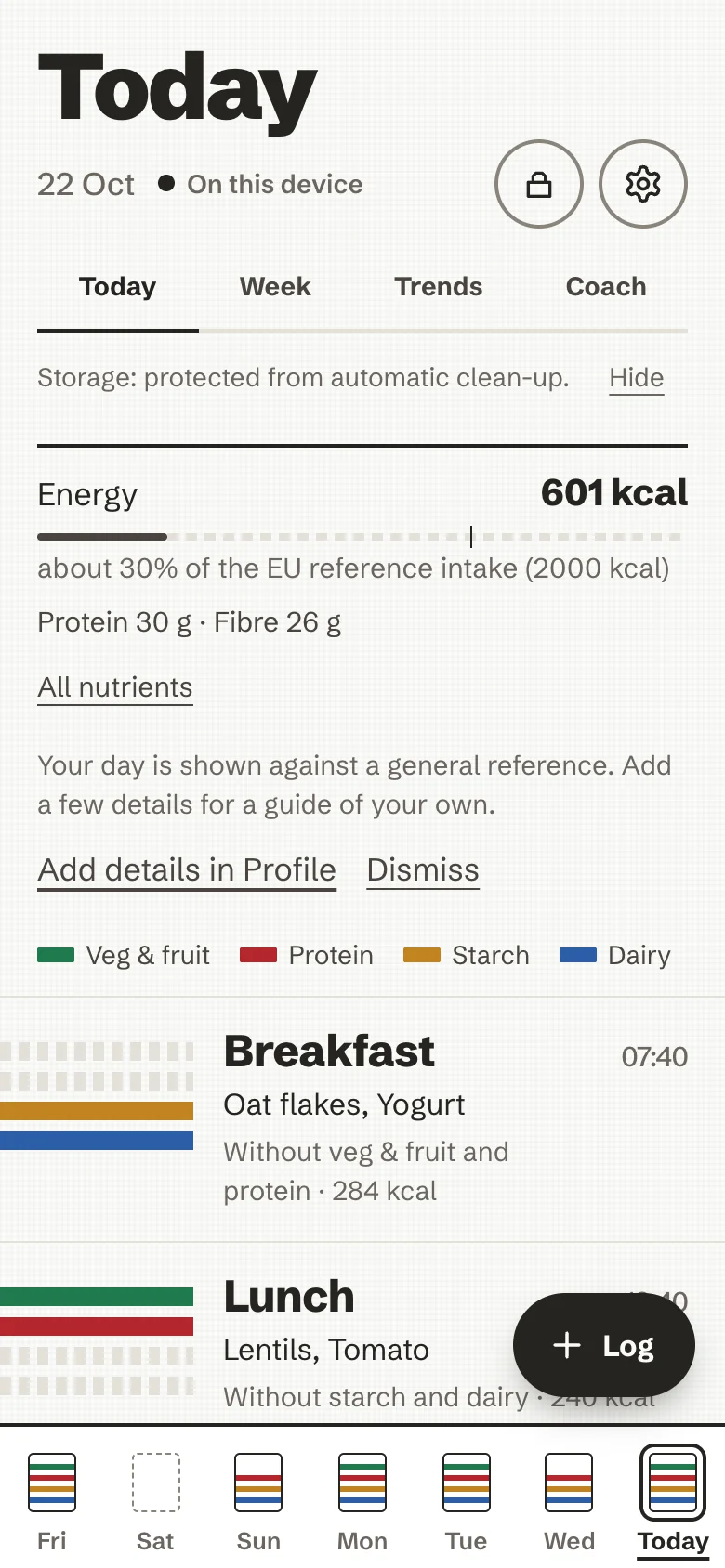
The look: a striped kitchen towel
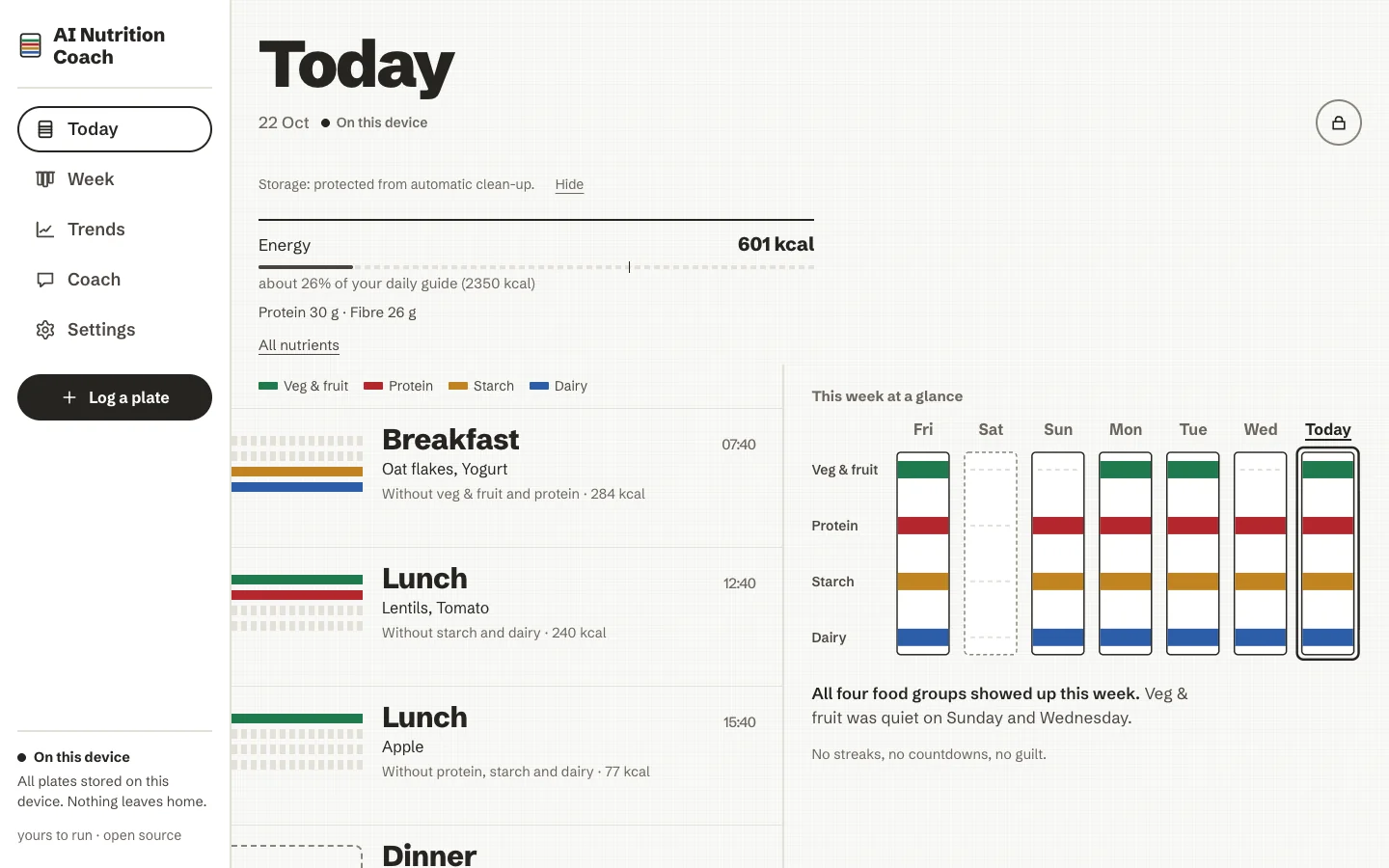
The day is a towel laid on the table. Each meal weaves one band across it, and each food group on the plate is a dyed stripe in a fixed order:
- Veg and fruit
- Protein
- Starch
- Dairy
A group that is missing leaves bare cotton, drawn as a dashed seam, never as a warning colour. Each dye means one food group and always sits beside its name, so nothing rests on colour alone. When a plate is logged its stripes are woven in from the left; under reduced motion they simply appear. The design system is DESIGN.md.
Logging a plate
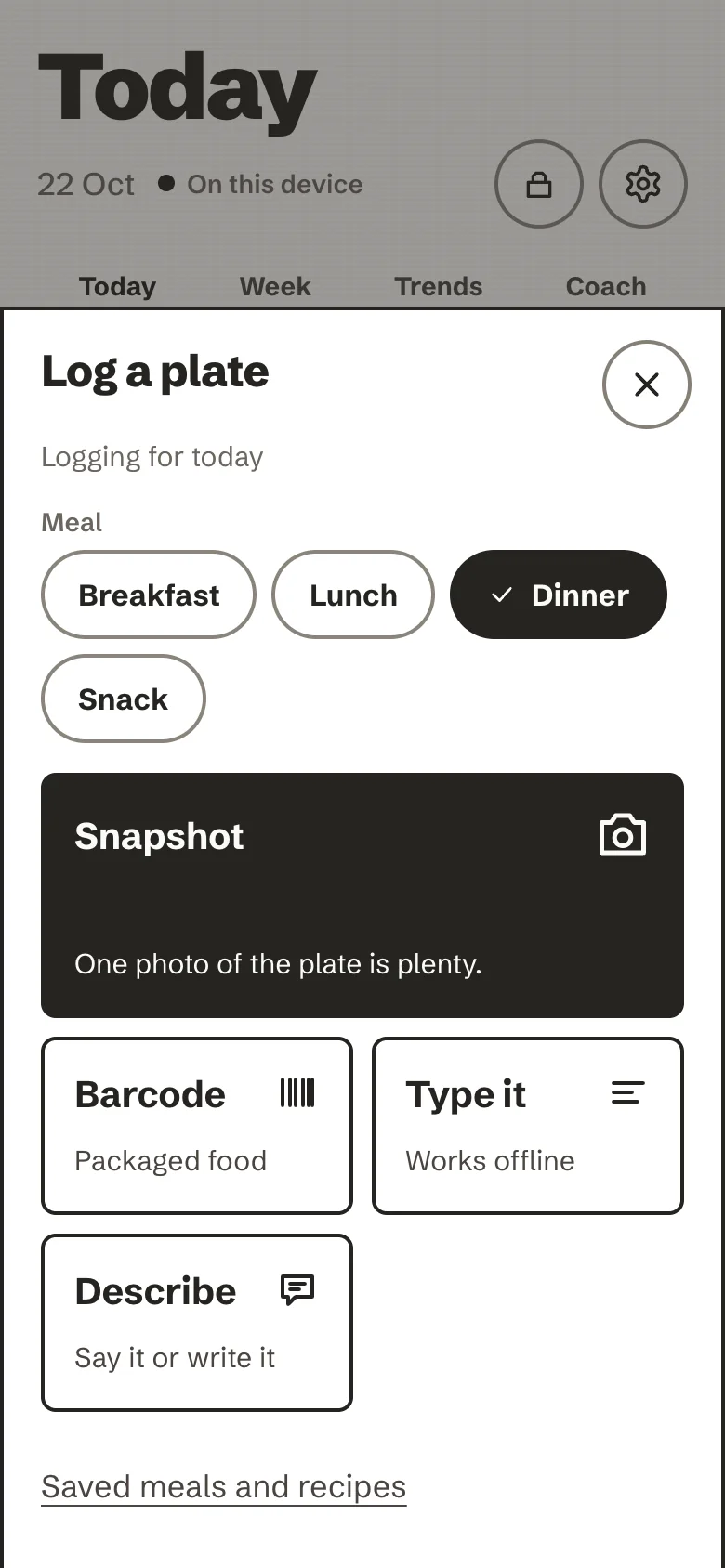
Log opens one sheet with every way in, and you review foods and amounts before anything is saved. The meal always lands: offline, without AI, or with an unknown barcode, you get the closest matches and a quantity to adjust.
| Way | In short |
|---|---|
| Type it | Ranked matches from the built-in food list and the CIQUAL table (about 3,500 generic foods, typos forgiven), portion presets or grams, several foods on one plate, custom foods with their own nutrition. Works offline. |
| Barcode | Read on the device, looked up on Open Food Facts with only the barcode sent. |
| Describe | "Two eggs, toast with butter, a coffee with milk", written or, with an AI, said out loud. Without AI, matched on the device. |
| Paste a recipe | The ingredients or the whole text of a recipe page; nothing is fetched from the web. |
| Snapshot | One photo, with an AI you chose, after your yes; location and camera details are removed first. |
| Saved meals and recipes | A plate kept under a name, or a home recipe worked out per serving. |
| Again and copy | Log this again on any plate, or Copy this day to today. |
| Edit a plate | Change amounts, remove or add a food, move it to another meal or day; totals and the coach note follow. |
| Another day or meal | Select a day in the week strip and choose the meal in the log sheet: yesterday's dinner, or a lunch logged at 16:10. |
All of it, step by step: Log a plate.
The day and the week
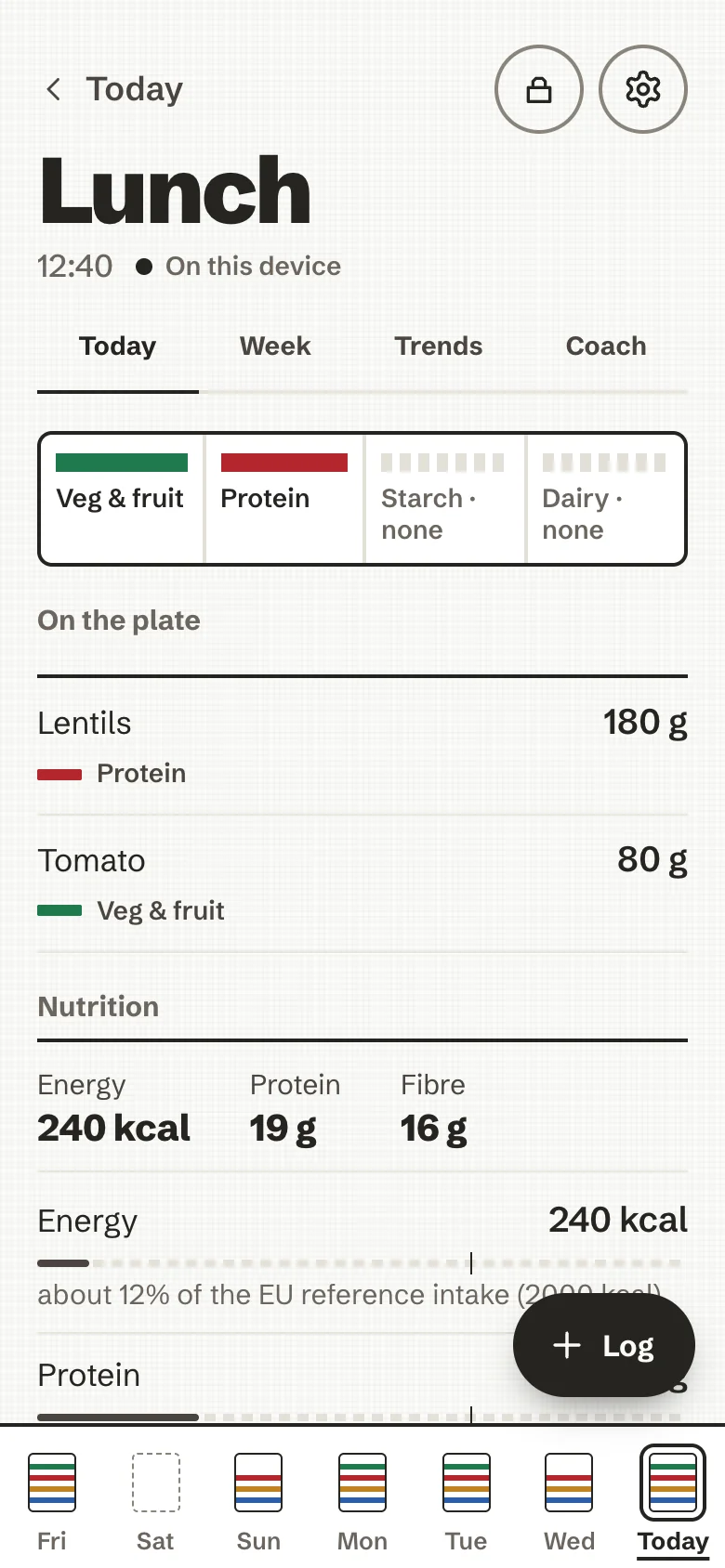
Today stacks the day's plates as bands, with the time, the foods, the groups that are missing and an approximate energy figure. On a phone, the week sits folded in the dock; on a computer, a rail and This week at a glance sit beside the day. Tap a band for the plate: each food with its grams, and its nutrients.
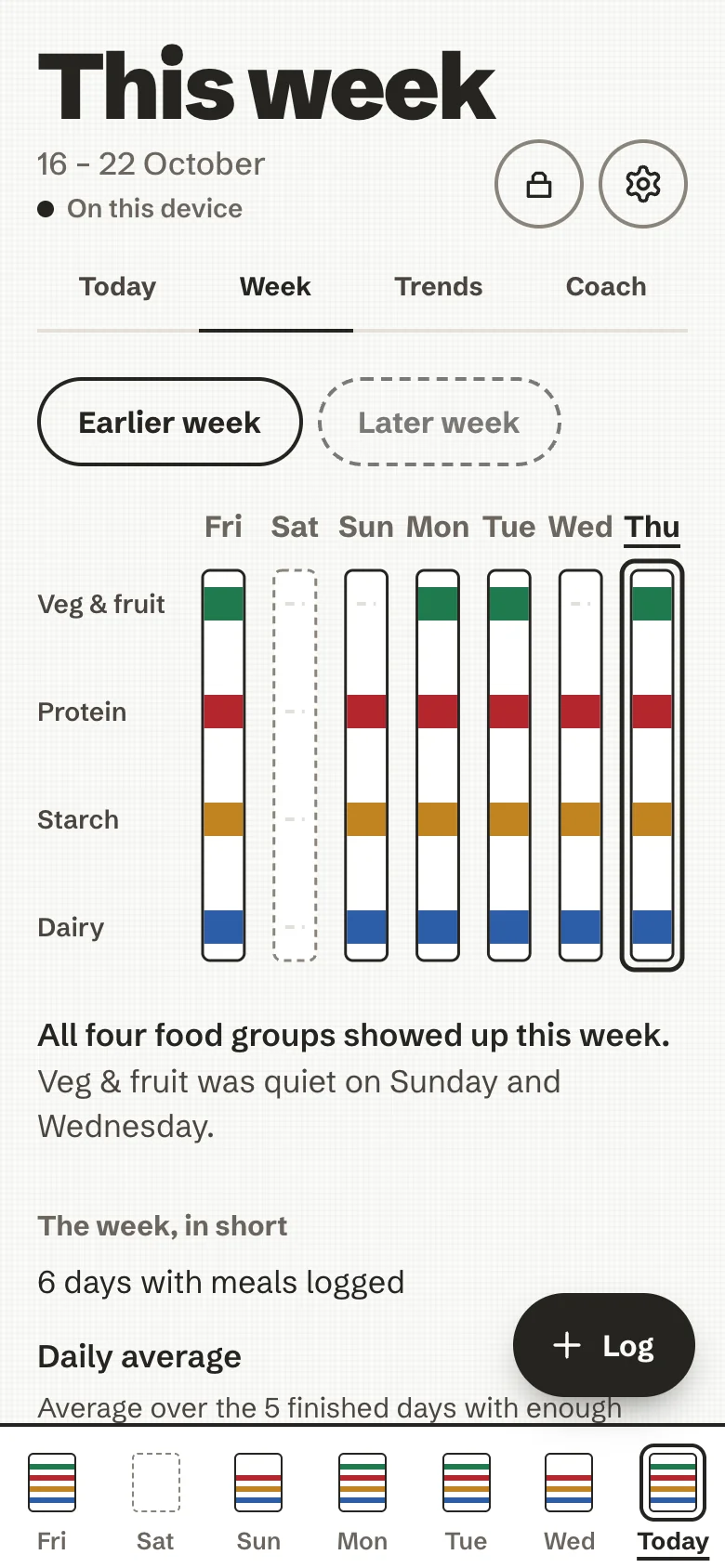
This week hangs seven towels side by side, says in a sentence which groups showed up and which stayed quiet, and adds The week, in short: days logged, daily averages and a few remarks worked out on the device.
More: Your day and your week.
Nutrition numbers
Grams per food, and for each plate and each day: energy, protein, carbohydrate, sugars, fat, saturated fat, fibre and
salt. Each value comes with a neutral bar and a sentence, for example "about 9% of the EU reference intake (2000
kcal)". Estimates are marked ~; unknown values are left empty, never shown as zero. An optional profile (with height, weight and waist if you choose to enter them,
encrypted and erasable) tunes your daily guide, and one switch hides the numbers if they feel stressful. Going past
the guide is said in plain text, never in red; an opt-in line can state the distance to it. Open Food Facts' Nutri-Score and NOVA can appear
as information about a product, never as a score of you.
More: Nutrients, against the EU reference intakes.
Weigh-ins, trend and history
An optional, one-tap weigh-in (weight for any past day, a waist if you like), a smoothed trend drawn as one ink line, the weeks as ticks, and what you logged each day against your daily guide, on a Trends screen. Descriptive only: "lower than", "higher than", never a target, a streak, a reminder or a colour for better or worse. A calm line appears if the trend falls faster than about 1 % a week. A short first-run welcome sets up your goal and guide, and you can move back through earlier weeks on the week screen. See Trends.
The coach
The coach asks rather than tells. After a plate it may offer one question, with Sure and Ask later; dismissing it costs nothing, and it never asks the same question twice. The built-in questions and the week's remarks are rules on the device and need no AI. They follow your diet and allergies (a vegan never hears about eggs or cheese) and your goal: with a daily guide of your own, at dinner, a day well above it gets one note naming the foods that carried the energy; with the goal to lose weight, a few satiety suggestions drawn from the foods you actually log. Try it this week keeps one small step, shown quietly on Today and looked back on in the week review. The coach page is useful without an AI: your step, the latest notes, the week, your guide. With an AI and a separate yes, it can also write its notes, answer questions about your last seven days (with the goal to lose weight, including how to lose it, within safe limits), and write a paragraph about the week. Every AI text is checked before it is shown, and a question about an eating worry, a symptom, a very low intake or a very fast loss is answered on the device and never sent.
More: The coach.
AI, only if you want it
Exactly one AI choice is active at a time, in Settings → Your AI:
| Choice | Status |
|---|---|
| No AI | The default, always available, nothing sent |
| My own key | Built: any OpenAI-compatible endpoint, your key, kept in the encrypted store and bound to its host |
| Provided by this server | Built: offered only when the operator set one shared key on the server; the key never reaches the browser |
| Free model (hosted quota) | Planned, not built: it needs a server-side relay |
| Model on this device | Planned, not built |
Photos, Describe and coaching each have their own consent, recorded for one destination and cleared when the destination changes. More: Your AI, and every field of every request in AI tiers, in detail.
Your data
An encrypted store in your browser, opened by a passphrase only you know; a lock that closes it; an encrypted backup file you can restore on another device; plain CSV and JSON exports; and an erase that means it. The in-app privacy page lists what is stored, what is sent, and to whom.
More: Back up, export, erase and How it is secured.
Install, offline and updates
An installable web app on iPhone, Android and a computer, with its own icon and no browser bars. After the first load it opens without a connection. A new version waits for you: "A new version is ready", Reload or Later.
More: Settings, Install on your phone and The installable app.
Languages
English and French, following your device until you choose. AI texts follow the app's language. More: Languages.
Run your own
One command (bin/ai-nutrition-coach up), automatic HTTPS through Caddy or behind your own Traefik, or the published
image on ghcr.io. The container is non-root and read-only, holds no data and makes no outbound calls of its own.
More: Self-host.
Accessibility and the no-dark-patterns rules
- Every screen is checked against an accessibility floor (names, roles, contrast, 48 px targets) in tests and in a real browser. Sizes are in rem and follow the browser's text size. See Accessibility.
- The No-Dark-Patterns Standard is binding and enforced by tests: no streaks, badges, points, countdowns, celebratory pop-ups, red guilt states or spinners. Numbers are allowed; pressure is not.
- Adults only: no child or teen profiles, no biometric API, no birth date (Adults only).
Not built yet
- Sync between devices. Each browser is its own store. An encrypted relay where the server holds only ciphertext is planned in phases; the groundwork and the encrypted backup file are done, the relay is not (the roadmap).
- The hosted free AI quota and a model on the device.
- The tip jar, pending its named reviewer.
- A dark theme.
The complete list of accepted gaps is in the README.