Your day and your week
The app has two places to look back: Today, the Day Board, and This week. Both show balance as woven stripes first, and the numbers one tap away.
Earlier weeks
The week in view is the seven days ending today. On This week, Earlier week moves back seven days at a time (the dock's route, the towels, the day-by-day list and The week, in short follow it), Later week moves forward, and Back to this week returns. Pick a day and it opens on Today; Back to today on Today is one tap from anywhere. An earlier week says which week it is, by its dates: the week note ("All four food groups showed up in the week from 1 October to 7 October"), the dock's label ("Week from 1 October to 7 October: choose a day") and the coach's "Ask the coach about the week from ..." all name it, never "this week". Browsing an earlier week does not move where a new plate lands: that is today, unless you picked a day in the strip, and the log sheet names the day. Copy this day to today from an earlier week brings today back into view so you see the copied plates. The This week choice when you export means the current week, whichever week you are looking at. When Later week or Back to this week brings the current week back, focus goes to the page's heading. Only the week in view is read from the store. For months and years, see Trends.
The four groups
Every food belongs to one group, and every group has one dye, always shown beside its name:
- Veg and fruit
- Protein
- Starch
- Dairy
A group that is not on a plate is drawn as bare cotton, a dashed line, never as a warning colour. Foods outside the four groups count as other, which has no dye. The red is protein, and only protein: nothing in the app is ever "in the red".
Today, the Day Board
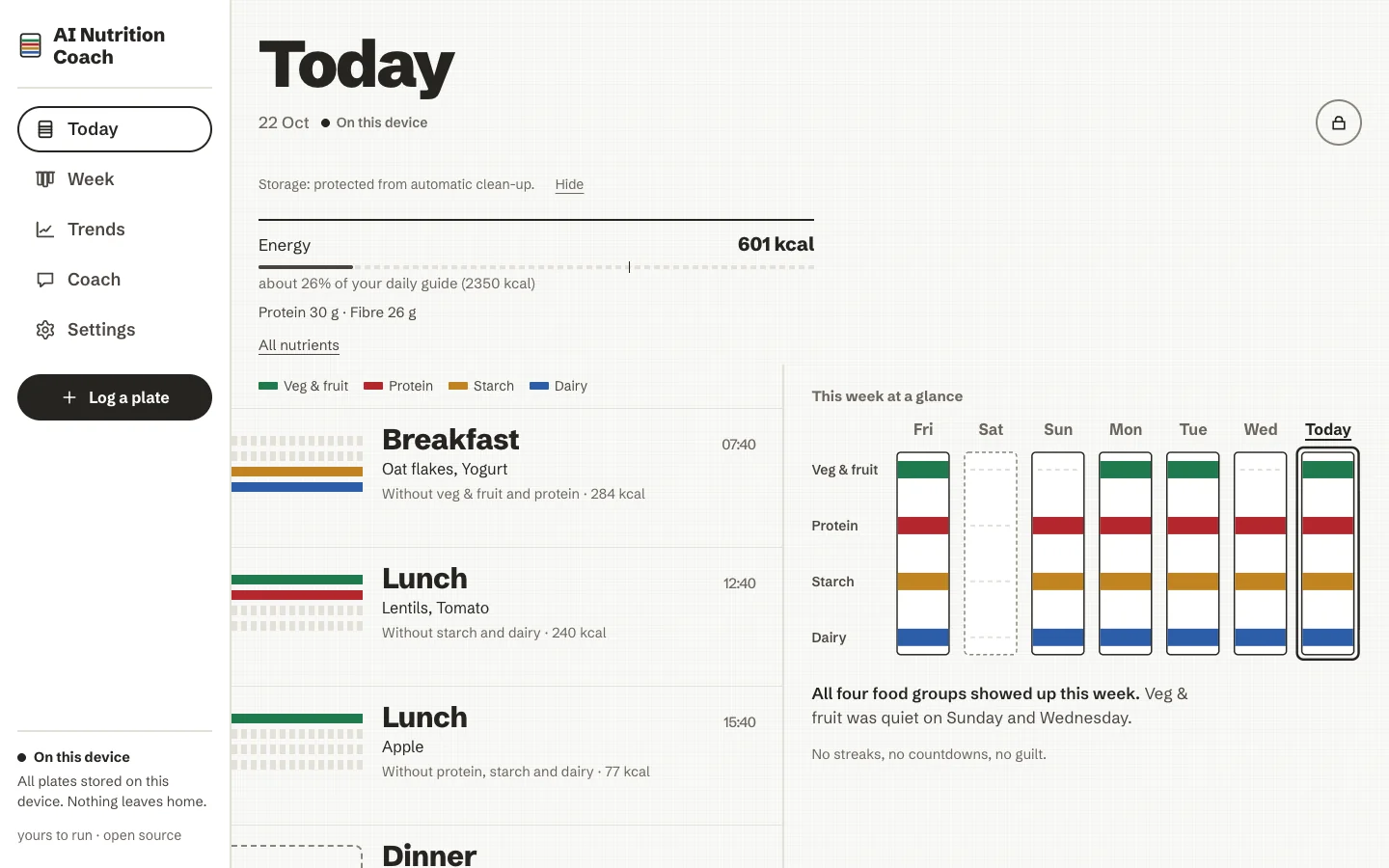
The day is a stack of bands, one per plate. Each band carries the stripes of the groups on the plate, and beside it the meal's name and time, the foods, the groups that are not there ("Without dairy"), and an approximate energy figure. A meal that is still to come is an open band with a dashed edge: Nothing logged yet.
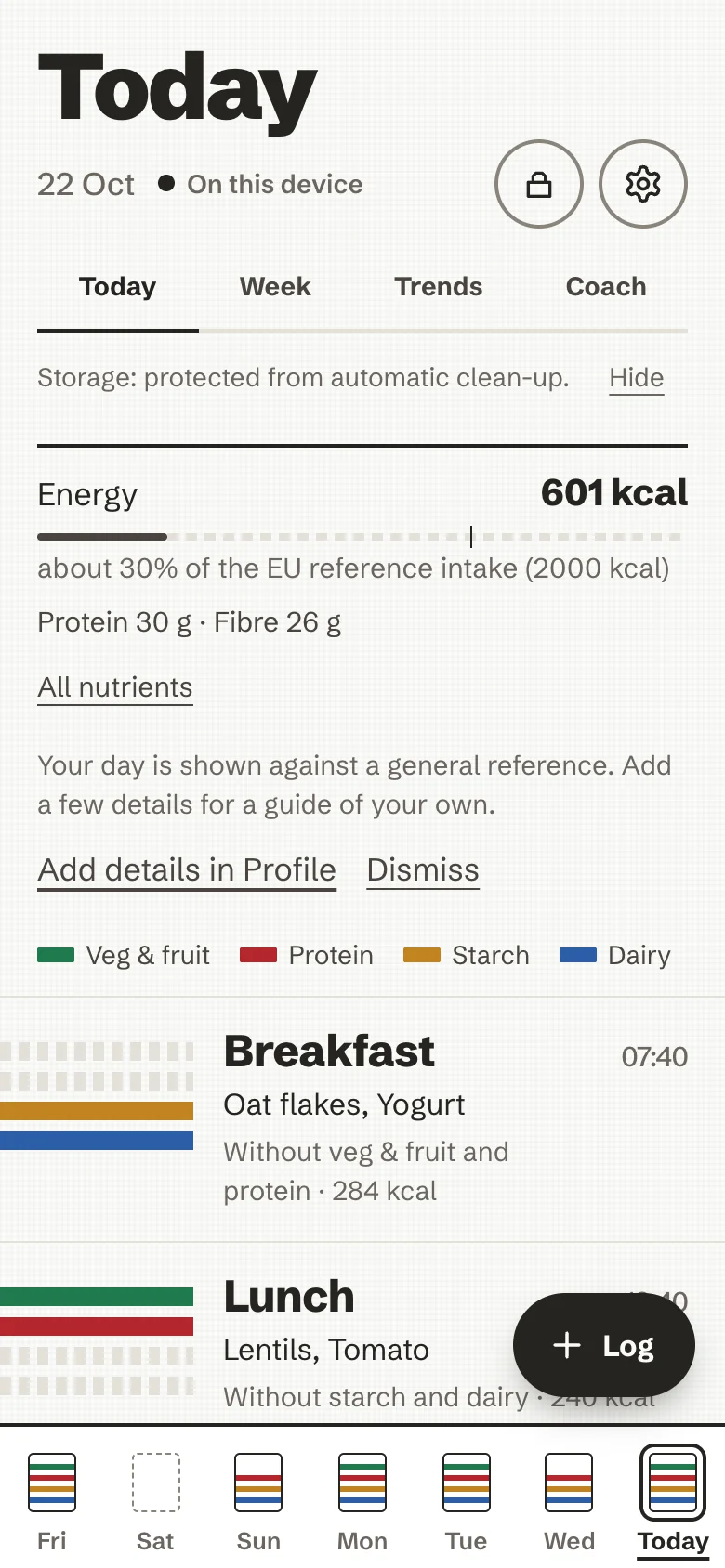
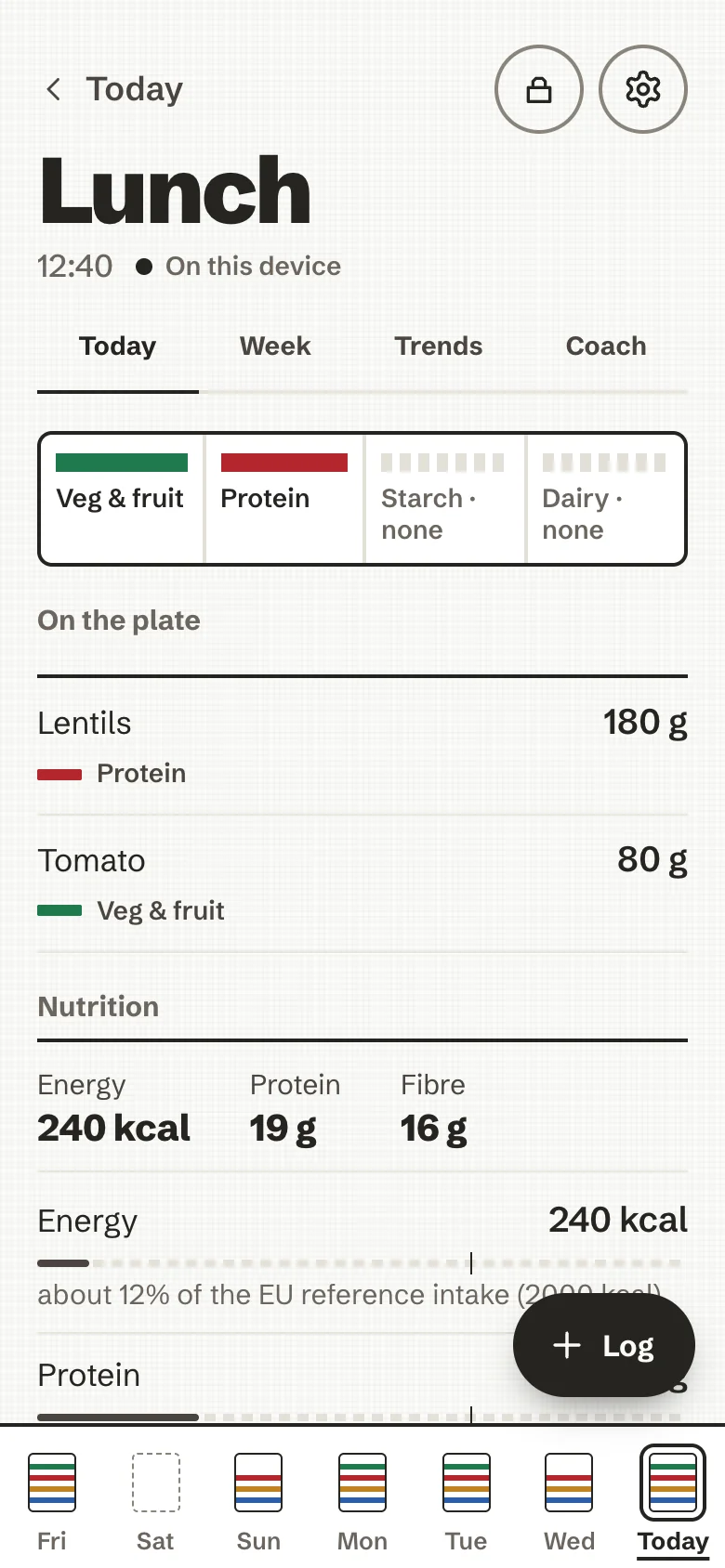
- At the top, one header row: the day, its date and a quiet On this device word, with the lock and the gear at the right. On a phone a row of four tabs under it (Today, Week, Trends, Coach) is on every screen. With numbers on, a short summary of the day comes first: energy against your daily guide (with the tick and "about 54 % of your daily guide"), protein, fibre and how many foods are not counted, and All nutrients takes you down to the full section. It never says "remaining". Any note that needs a look (the pace notice, this week's step) follows it.
- On a phone, the dock at the bottom holds the week as seven folded towels: small stripes for the groups logged each day, a dashed edge for a day with nothing logged. Tap one to see that day. The floating Log pill sits above it.
- On a computer, a rail on the left holds Today, Week, Trends, Settings and Log a plate, and This week at a glance sits beside the day.
- Under the bands, Today's nutrition adds up the day. One short list follows it: Add a weigh-in, Copy this day (on an earlier day) and Ask the coach. Trends and the coach are also the tabs under the header.
- A small label says where your plates are: On this device. Once per session, a plain line also says whether the browser has agreed to keep your data safe from automatic clean-up; if it has not, it suggests a regular backup.
A plate's page
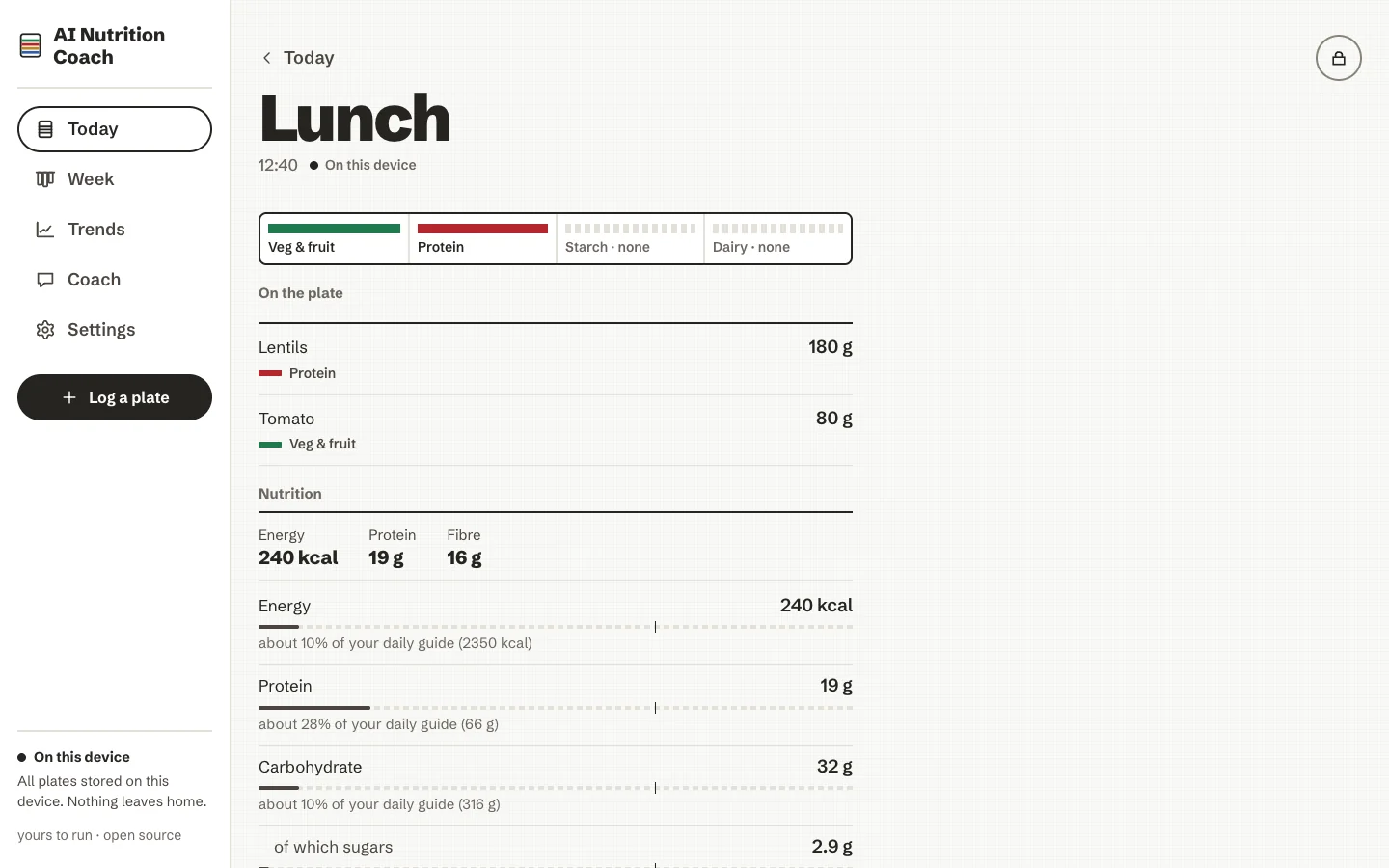
Tap a band to open its plate:
- the groups it carries, by name;
- each food with its portion and weight. A weight you typed is shown as it is; a weight that is a guess, from a preset or a photo, is marked ≈;
- the plate's nutrition (below);
- Edit this plate, Save as a meal, Log this again, and Remove this plate. Removing asks once, calmly, and takes the plate's coach note with it.
Editing a plate
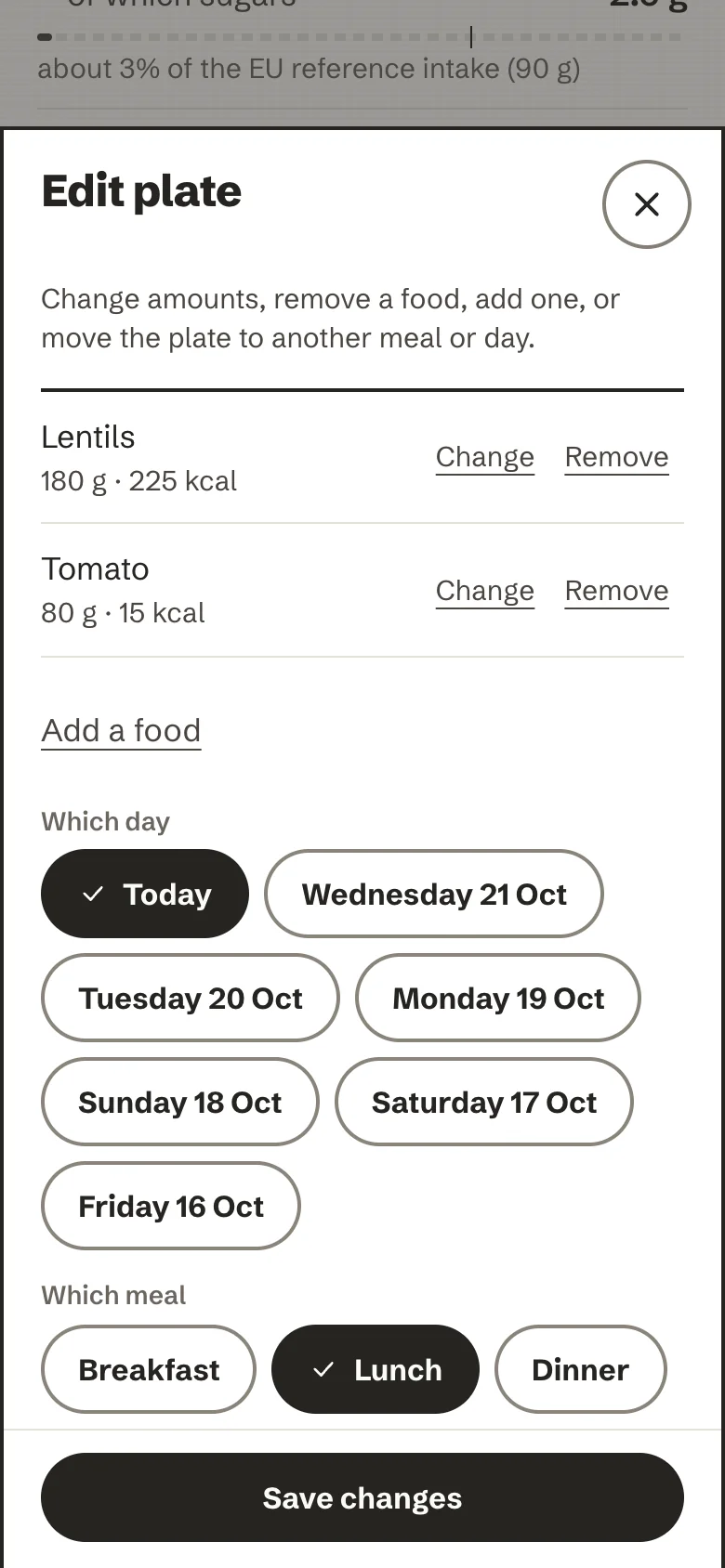
Edit this plate opens a sheet where you can change the amount of a food (Change: its portions, or a weight in grams), take a food off (Remove), add one (Add a food, the same search as Type it), and move the plate to another day (the last seven) or meal. A food with no weight or no nutrition opens already, with fields to complete it. Nothing changes until Save changes. A plate must keep at least one food; to drop the whole plate, remove it.
Saving swaps the plate for the edited one in one step and writes a new coach note for it, so a note never describes food that is no longer there; the old note goes with the old plate. If you move the plate to a different meal or day, its time becomes that meal's usual hour; otherwise the time stays exactly as it was. On synced devices the edit travels as "the old plate was removed, here is the new one": every device ends with the edited plate, and none brings the old one back. If you edit the same plate on two devices before they sync, both versions are kept and you can remove the one you do not want.
Nutrients, against the EU reference intakes
For each plate, each day and, on the week, each daily average, the app shows the nutrients it has data for: energy, protein, carbohydrate (of which sugars), fat (of which saturates), fibre and salt. Each is one row:
- the value and its unit, as text;
- a neutral bar, the same soft ink for every nutrient and every amount, with a small tick at the reference;
- a sentence naming the reference: "about 24% of the EU reference intake (2000 kcal)".
The references are the daily amounts in EU Regulation 1169/2011 for an average adult eating 2,000 kcal a day; fibre has no EU value, so 25 g, a general recommendation, is used. What are reference intakes? under the bars says this in the app. If you fill in your profile, the bars use your daily guide instead, worked out from European (EFSA) reference values for your age range, sex and activity. Either way it is information, not a target.
How the numbers are kept honest:
- Estimates carry "~". A value worked out from a guessed weight is never shown as exact.
- Unknown is left empty, never shown as zero. When some foods have no weight or no nutrition data, a sentence says what the total is based on ("Based on 3 foods with a weight and nutrition data; 1 without.").
- A total that leaves something out says "at least". If any food has no weight, or has no value for that one nutrient (a food that knows its energy but not its fibre), the figure reads "at least 1,450 kcal" and the day's energy adds "2 foods not counted". One line under the bars explains the words. The sentence about what the total is based on opens to a list of those foods, each with Complete, which opens the plate's edit sheet. Plate, day and week averages all follow the same rule; nothing turns red.
- Past the reference, it says so in plain words ("about 120% of the reference"). Nothing turns red, nothing says "over budget", "remaining" or "exceeded", and the bars never change colour.
- No rings, no gauges, no grades, no score of you. Open Food Facts' Nutri-Score and NOVA can appear on a packaged product, attributed, as information about that product.
The design record behind this is ADR 0006: Real nutrition numbers, calm framing.
Hiding the numbers
If numbers about food feel stressful, turn off Show nutrition numbers in Settings → Nutrition. The values and bars are hidden; your meals and their weights stay. The coach's built-in questions that quote an amount are left out, and an AI coach is told not to quote amounts.
This week
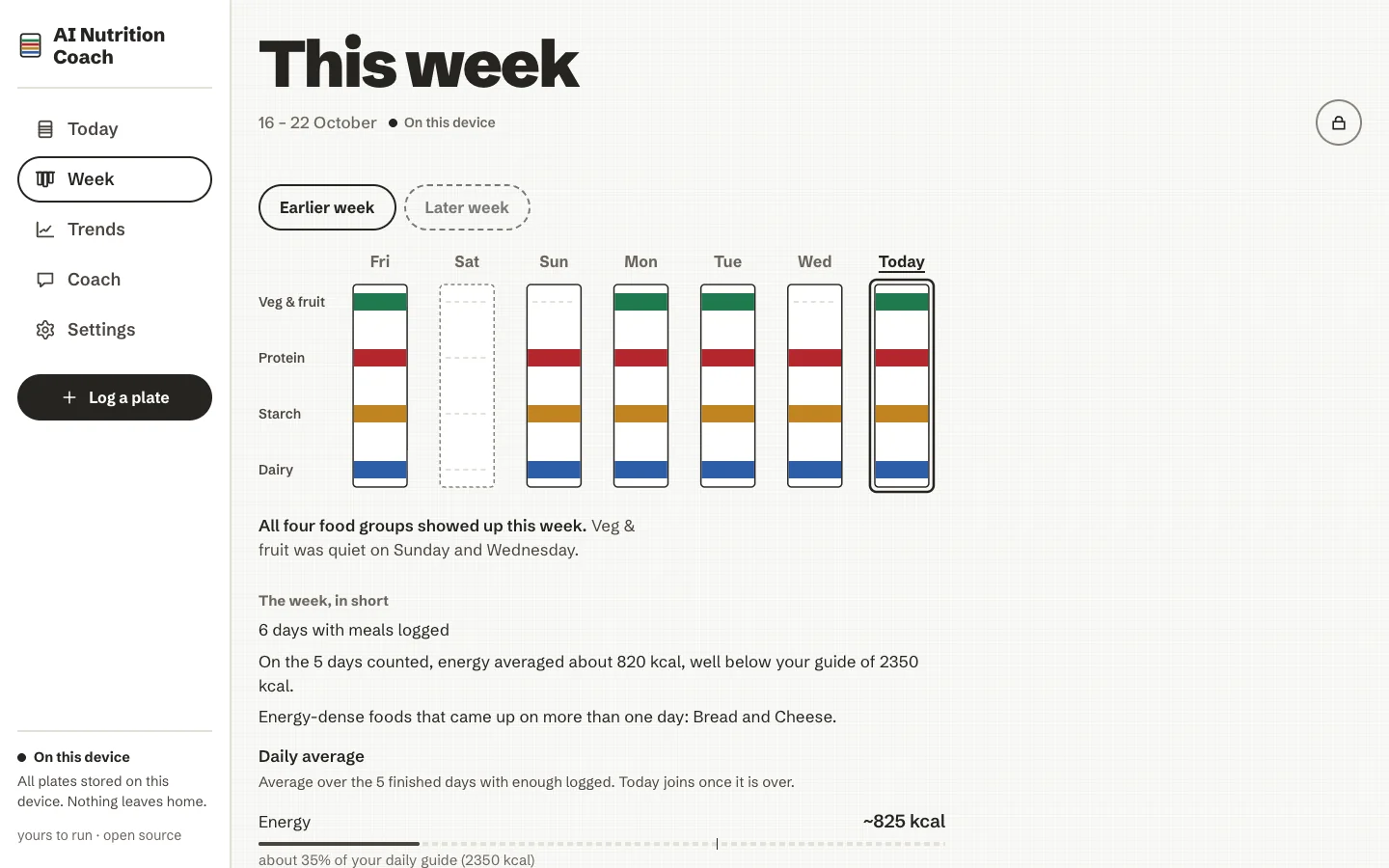
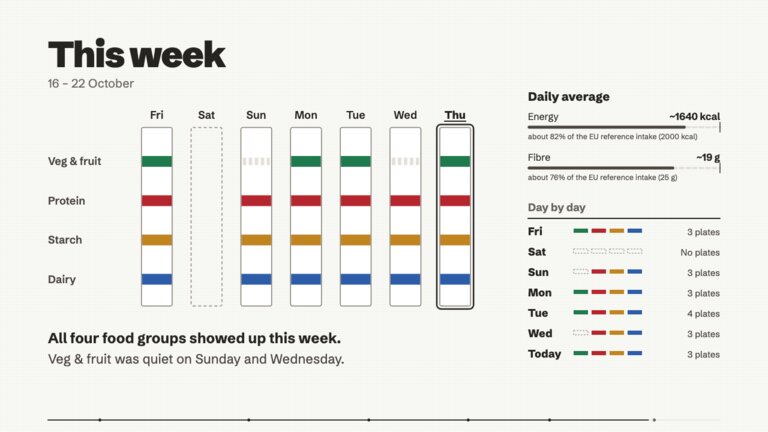
Seven towels hang side by side under the weekday names, with the group names down the left. Each towel shows a dyed stripe for every group that appeared that day and a dashed line for the rest; today's towel is outlined in ink. A plain sentence underneath says which groups showed up, and which stayed quiet ("Dairy was quiet on Tuesday and Friday.").
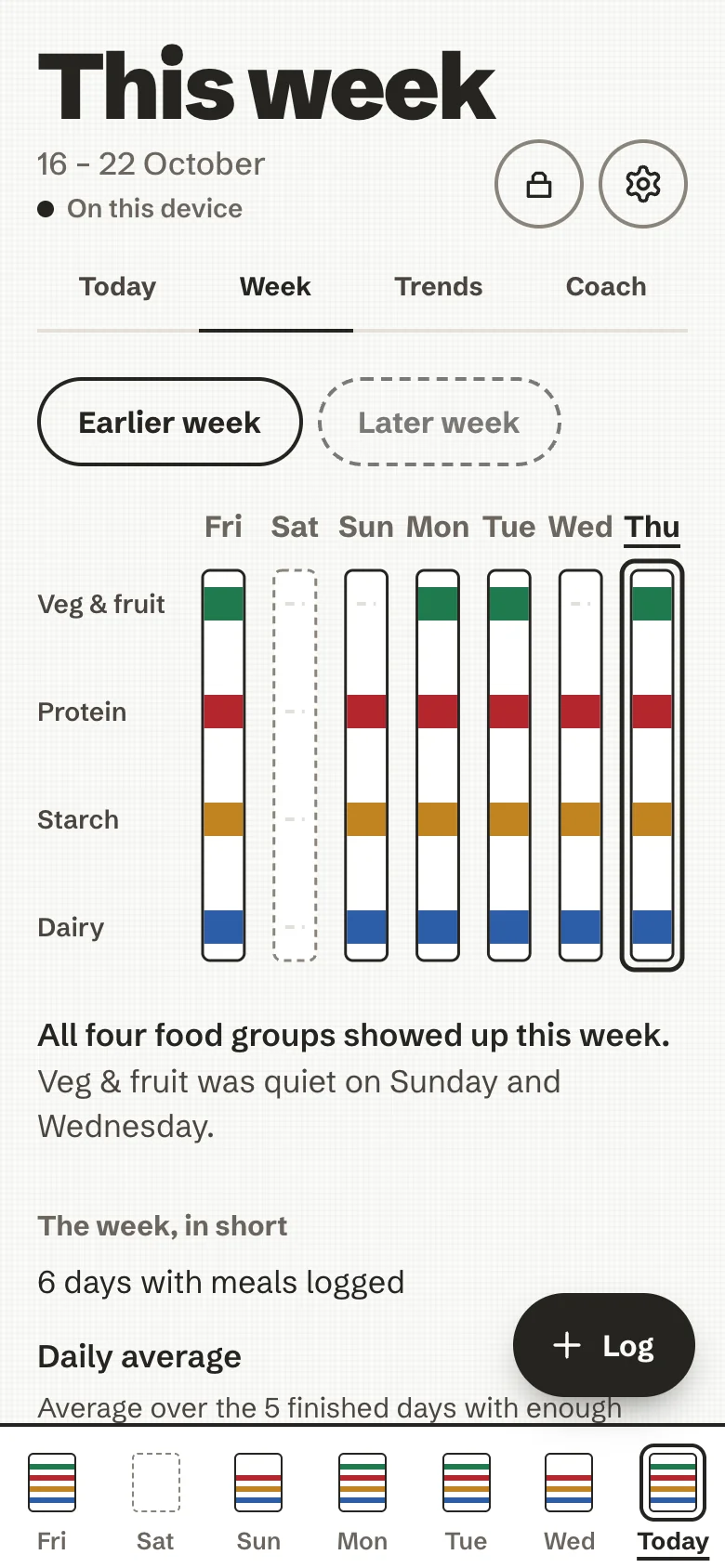
Below the towels:
- Day by day, under a 2px ink rule: each day's name, four small stripe segments (dashed when a group is absent) and its number of plates. Tap a day to open its board.
- The week, in short: how many days have meals logged, the daily average of each nutrient over the days that are complete enough (see below), What went well and One thing to try. These remarks are rules worked out on the device; they need no AI.
- With an AI and AI coaching turned on, Ask the coach about this week writes a short paragraph about it. See The coach.
Which days the average uses
A day counts toward the daily average only when both hold:
- it is finished: it is before today, so a day you are still logging never pulls the average down;
- it has at least two plates that each have at least one food with a weight and nutrition data.
The week says it in words, for example Average over the 5 finished days with enough logged. Today joins once it is over., and, when some days were left out, 1 other finished day had too little logged to count. Why two plates: a day with a single snack logged is usually a day you did not log, not a day you ate little, and averaging it in would make protein or fibre look low. Two is a deliberately small bar. Days are calendar days in your time zone, so the clock change does not move a day's edges.
One thing to try only suggests more protein or fibre (or less salt or sugars) when at least three counted days know that nutrient. With fewer, the week stays quiet about it. Today and the days left out still show on the towels and in the day count; they are only not averaged.
A line on the page says it plainly: no streaks, no countdowns, no guilt.